

MATLAB | 给热图整点花哨操作(三角,树状图,分组图)
前段时间写的特殊热图绘制函数迎来大更新,基础使用教程可以看看这一篇:
https://slandarer.blog.csdn.net/article/details/129292679


原本的绘图代码几乎完全不变,主要是增添了很多新的功能!!!
工具函数完整代码放在最后,但还是建议大家直接去fileexchange或者gitee下载,因为还包含一些素材包(主要是slanCM包),当然也可以单独去下载slanCM包不过麻烦些:
本文项目gitee
https://gitee.com/slandarer/matlab-special-heatmap
slanCM所在gitee
https://gitee.com/slandarer/slanColor
新版新增功能
6 三角化
此部分所使用数据:
% 随便捏造了点数据(Made up some data casually)
X=randn(20,15)+[(linspace(-1,2.5,20)').*ones(1,6),(linspace(.5,-.7,20)').*ones(1,5),(linspace(.9,-.2,20)').*ones(1,4)];
% 求相关系数矩阵(Get the correlation matrix)
Data=corr(X);
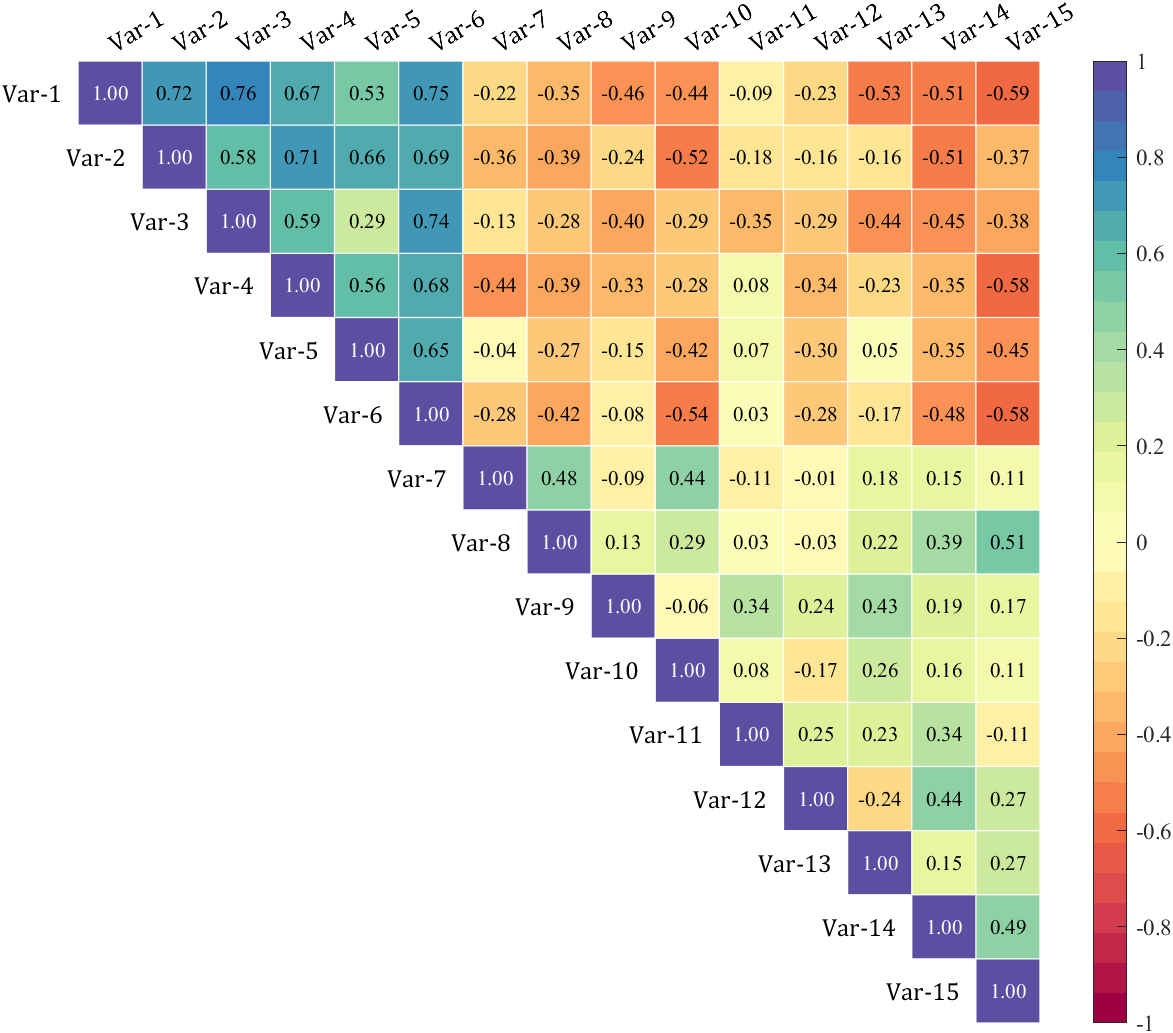
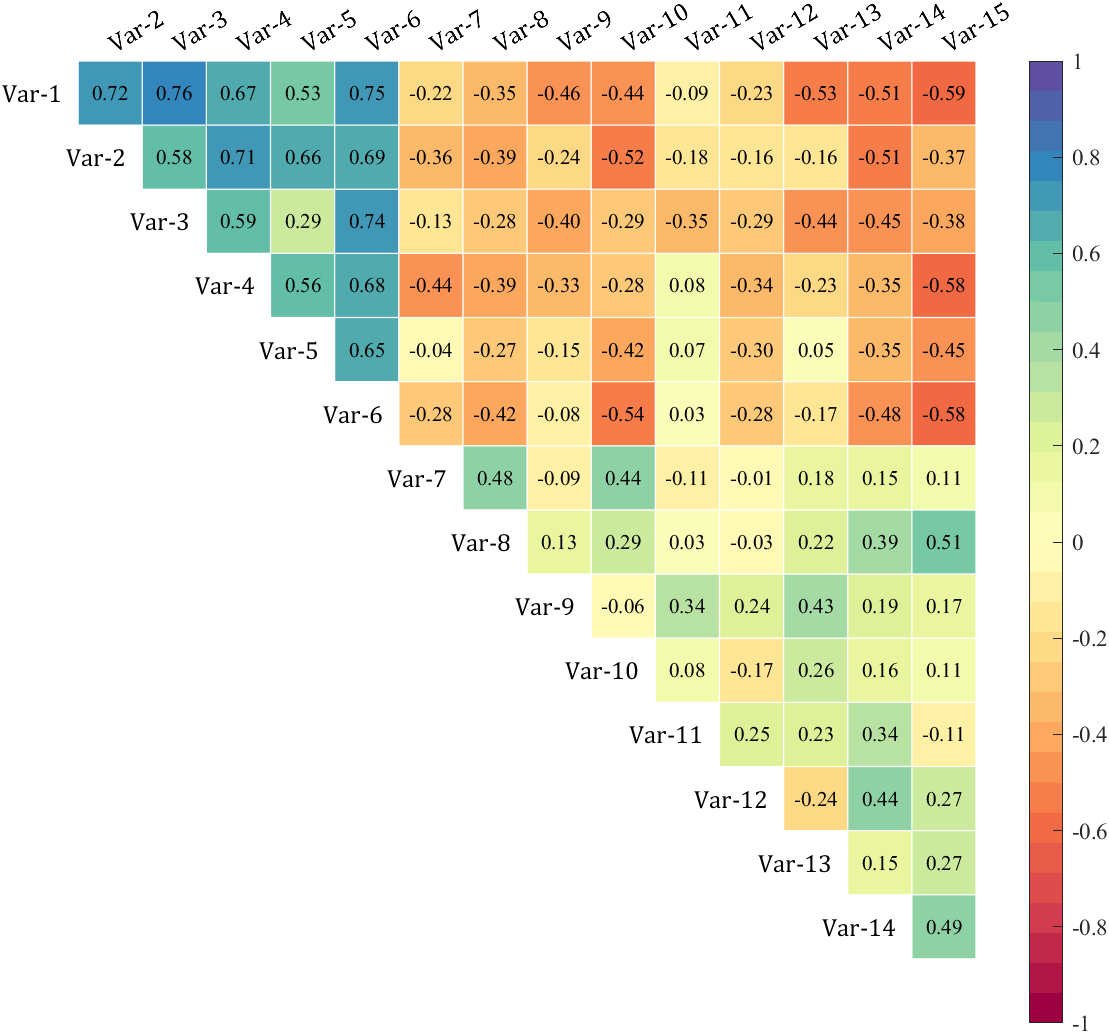
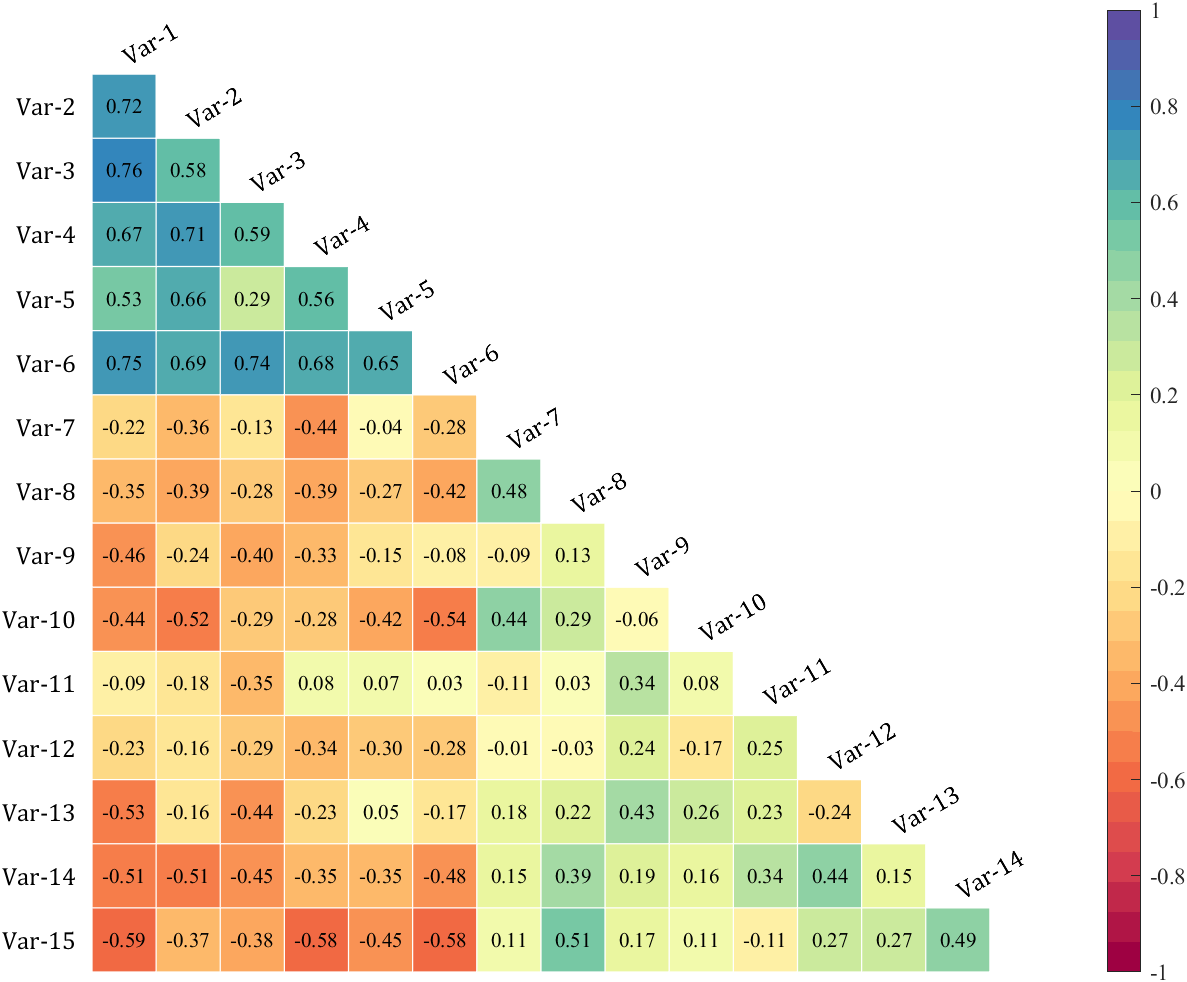
6.1 三角化类型
通过 setType() 函数设置三角化格式,可设置为:
- ‘triu’ : upper triangle : 上三角部分
- ‘tril’ : lower triangle : 下三角部分
- ‘triu0’ : upper triangle without diagonal : 扣除对角线上三角部分
- ‘tril0’ : lower triangle without diagonal : 扣除对角线下三角部分
% + 'triu'   : upper triangle                  : 上三角部分
% + 'tril'   : lower triangle                  : 下三角部分
% + 'triu0'  : upper triangle without diagonal : 扣除对角线上三角部分
% + 'tril0'  : lower triangle without diagonal : 扣除对角线下三角部分Type={'triu','tril','triu0','tril0'};
for i=1:length(Type)figure()SHM_s1=SHeatmap(Data,'Format','sq');SHM_s1=SHM_s1.draw();SHM_s1.setText();% 设置格式(set Type)SHM_s1.setType(Type{i})
%     exportgraphics(gca,['gallery\Type_',Type{i},'.png'])
end

6.2 设置标签名称
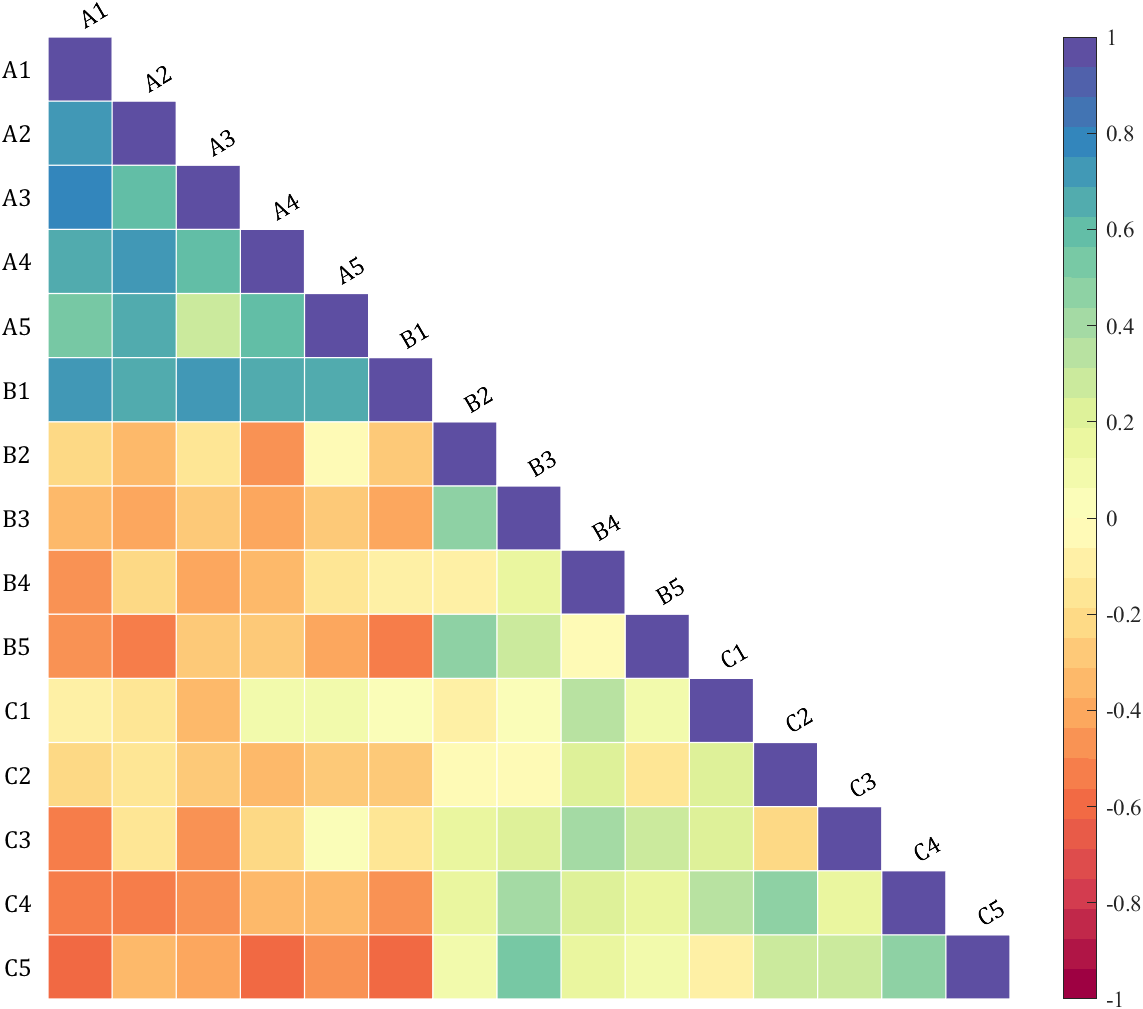
figure()
SHM_s2=SHeatmap(Data,'Format','sq');
SHM_s2=SHM_s2.draw();
SHM_s2.setType('tril');varName={'A1','A2','A3','A4','A5','B1','B2','B3','B4','B5','C1','C2','C3','C4','C5'};
SHM_s2.setVarName(varName)
6.3 设置标签字体
figure()
SHM_s5=SHeatmap(Data,'Format','circ');
SHM_s5=SHM_s5.draw();
SHM_s5.setType('triu');
% 设置标签颜色(Set Font Color)
SHM_s5.setRowLabel('Color',[.8,0,0])
SHM_s5.setColLabel('Color',[0,0,.8])

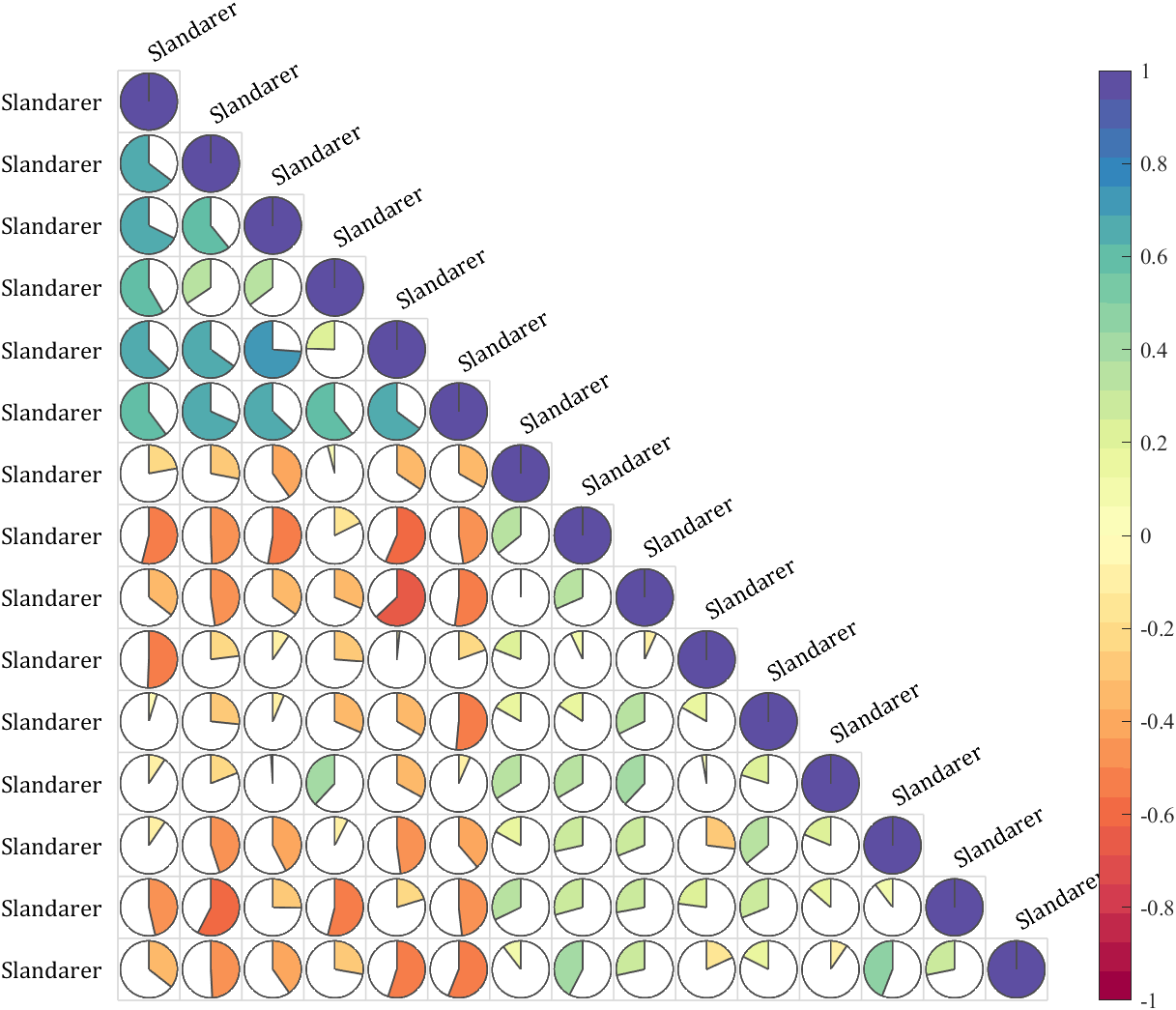
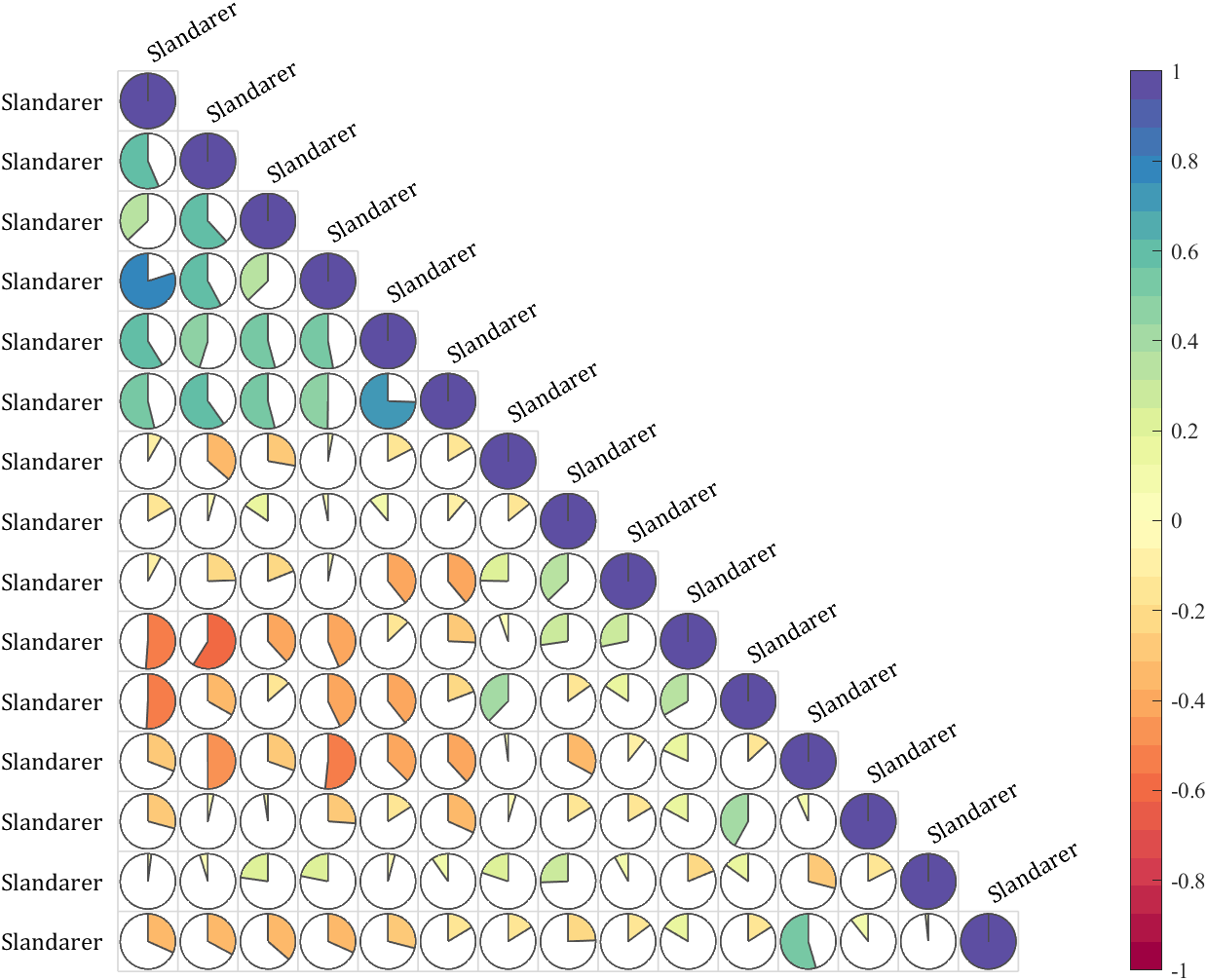
6.4 调整轴范围以避免遮挡
figure()
SHM_s3=SHeatmap(Data,'Format','pie');
SHM_s3=SHM_s3.draw();
SHM_s3.setType('tril');
SHM_s3.setVarName({'Slandarer'})
ax=gca;
ax.XLim(2)=ax.XLim(2)+1;
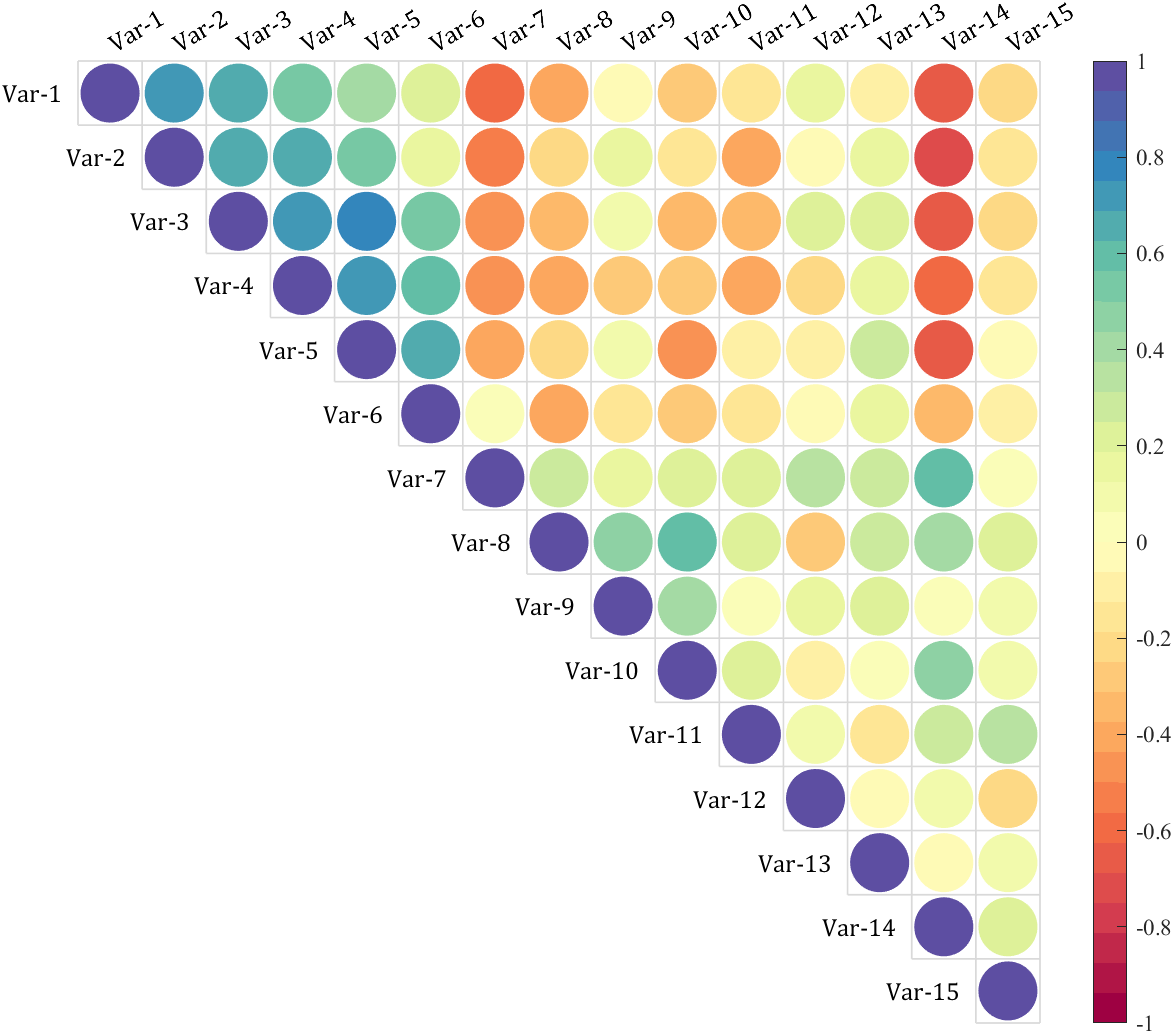
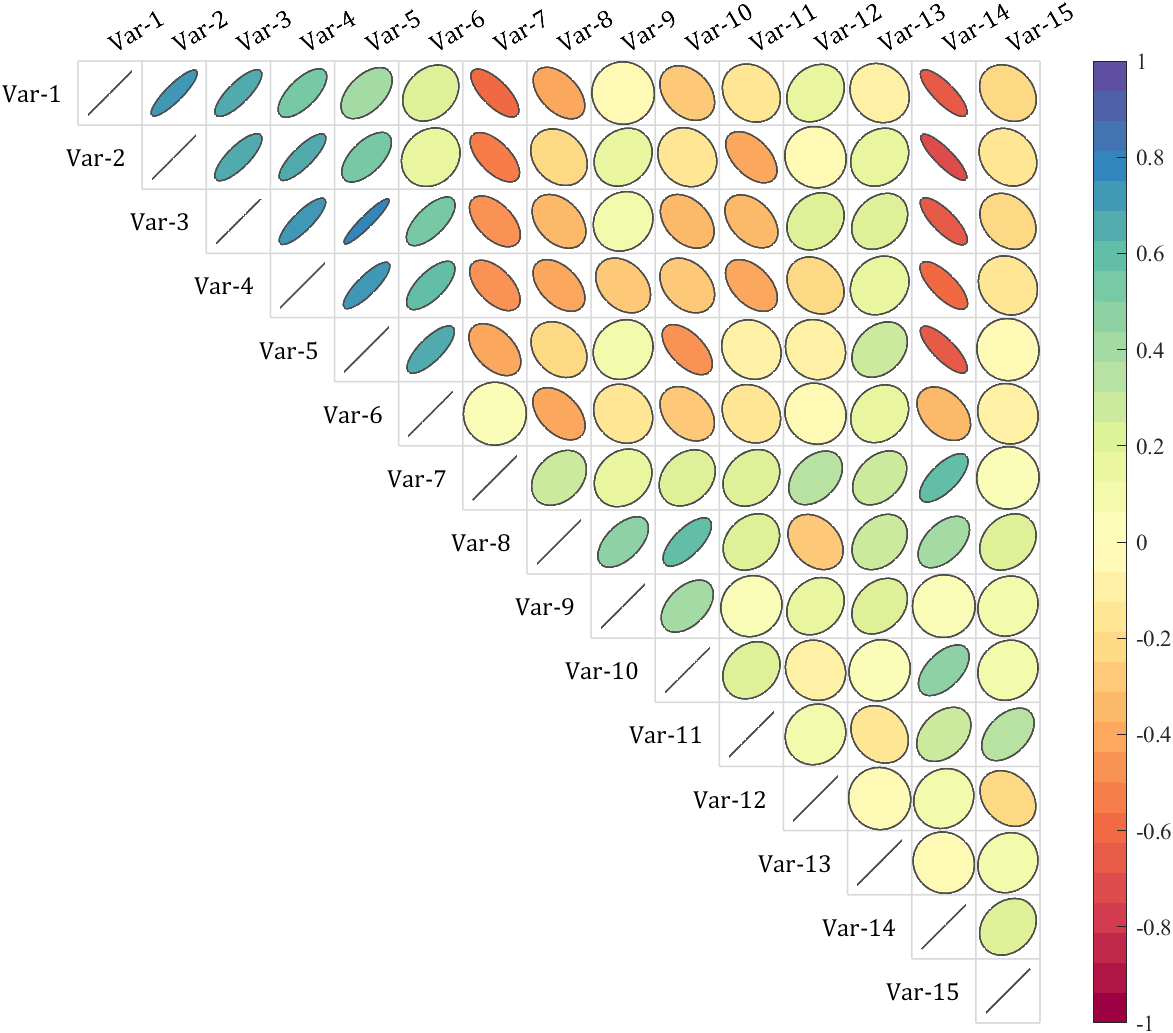
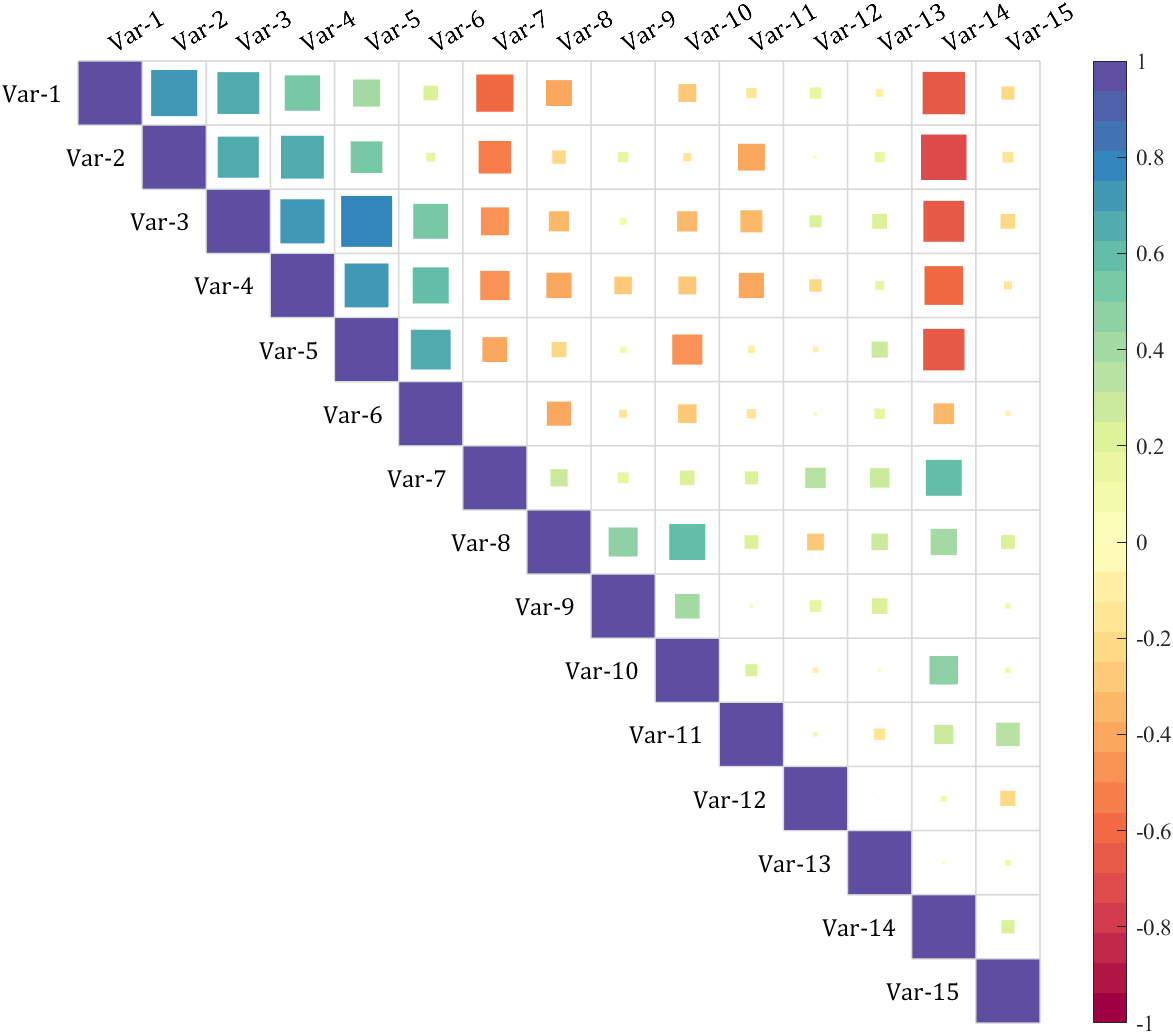
6.5 展示所有样式的上三角化
Format={'sq','pie','circ','oval','hex','asq','acirc'};
for i=1:length(Format)figure()SHM_s4=SHeatmap(Data,'Format',Format{i});SHM_s4=SHM_s4.draw();% 设置格式(set Type)SHM_s4.setType('triu');% exportgraphics(gca,['gallery\Type_triu',Format{i},'.png'])
end




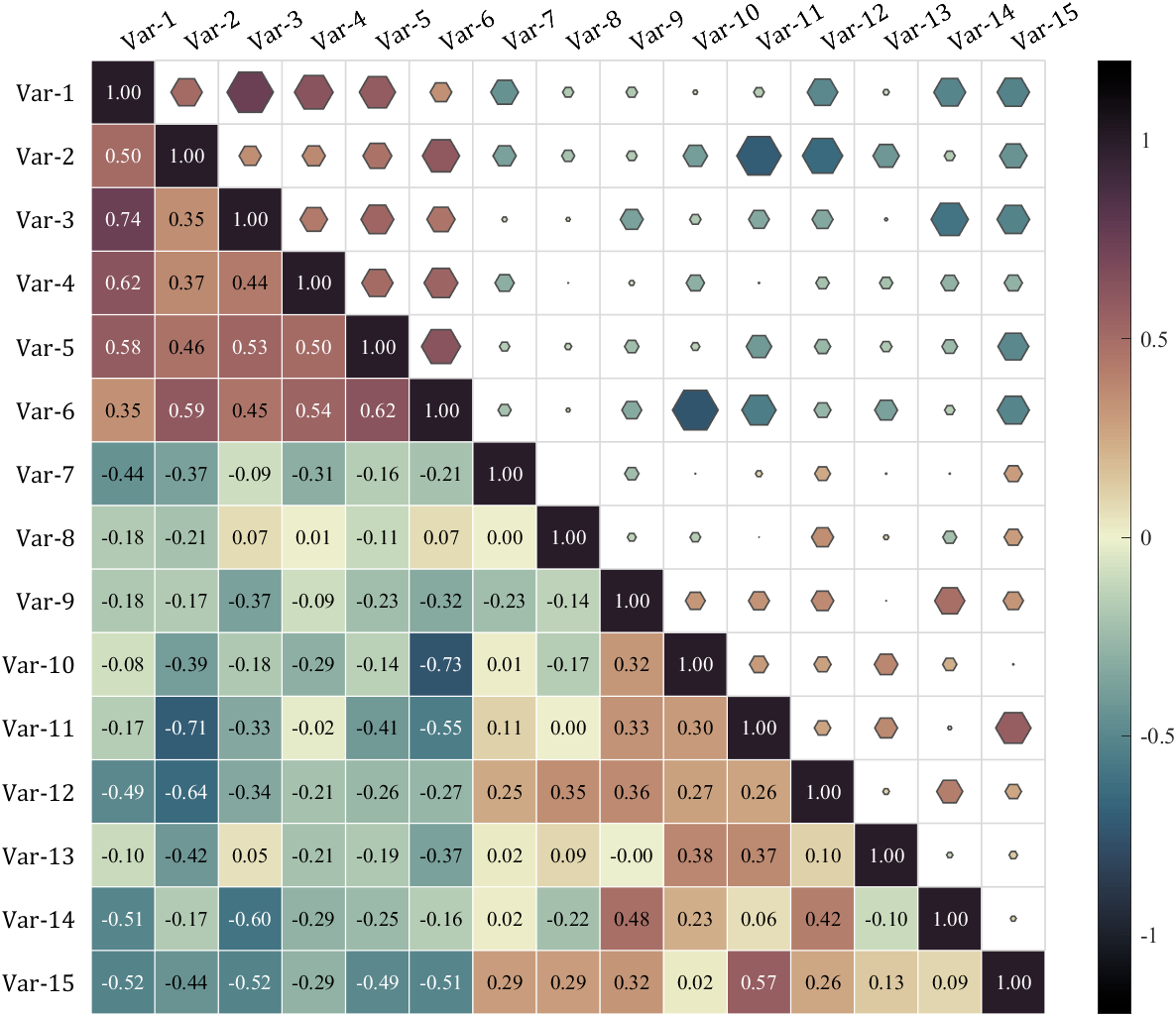
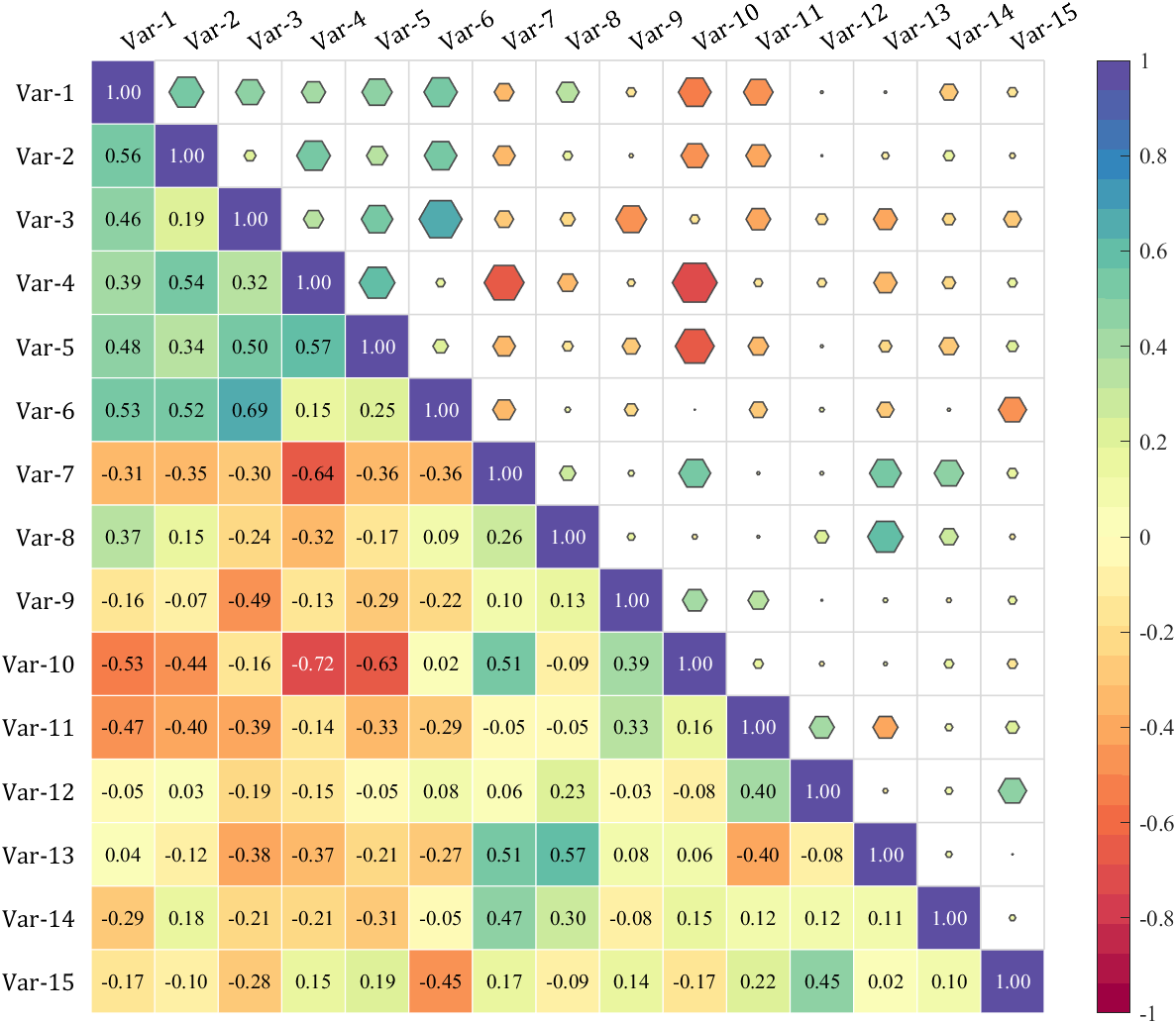
7 合并两个三角热图
就画两次并隐藏部分字体:
% 随便捏造了点数据(Made up some data casually)
X=randn(20,15)+[(linspace(-1,2.5,20)').*ones(1,6),(linspace(.5,-.7,20)').*ones(1,5),(linspace(.9,-.2,20)').*ones(1,4)];
% 求相关系数矩阵(Get the correlation matrix)
Data=corr(X);figure()
SHM_m1=SHeatmap(Data,'Format','sq');
SHM_m1=SHM_m1.draw();
SHM_m1=SHM_m1.setType('tril');  % 这个等号因为要增添文字很必要(This equal sign is necessary for adding text)
SHM_m1.setColLabel('Visible','off')SHM_m2=SHeatmap(Data,'Format','hex');
SHM_m2=SHM_m2.draw();
SHM_m2.setType('triu0');
SHM_m2.setRowLabel('Visible','off')
SHM_m2.setColLabel('Visible','on') % 显示隐藏的Var-1标签(Show the hidden Var-1 label)clim([-1.2,1.2])
colormap(slanCM(141))SHM_m1.setText();

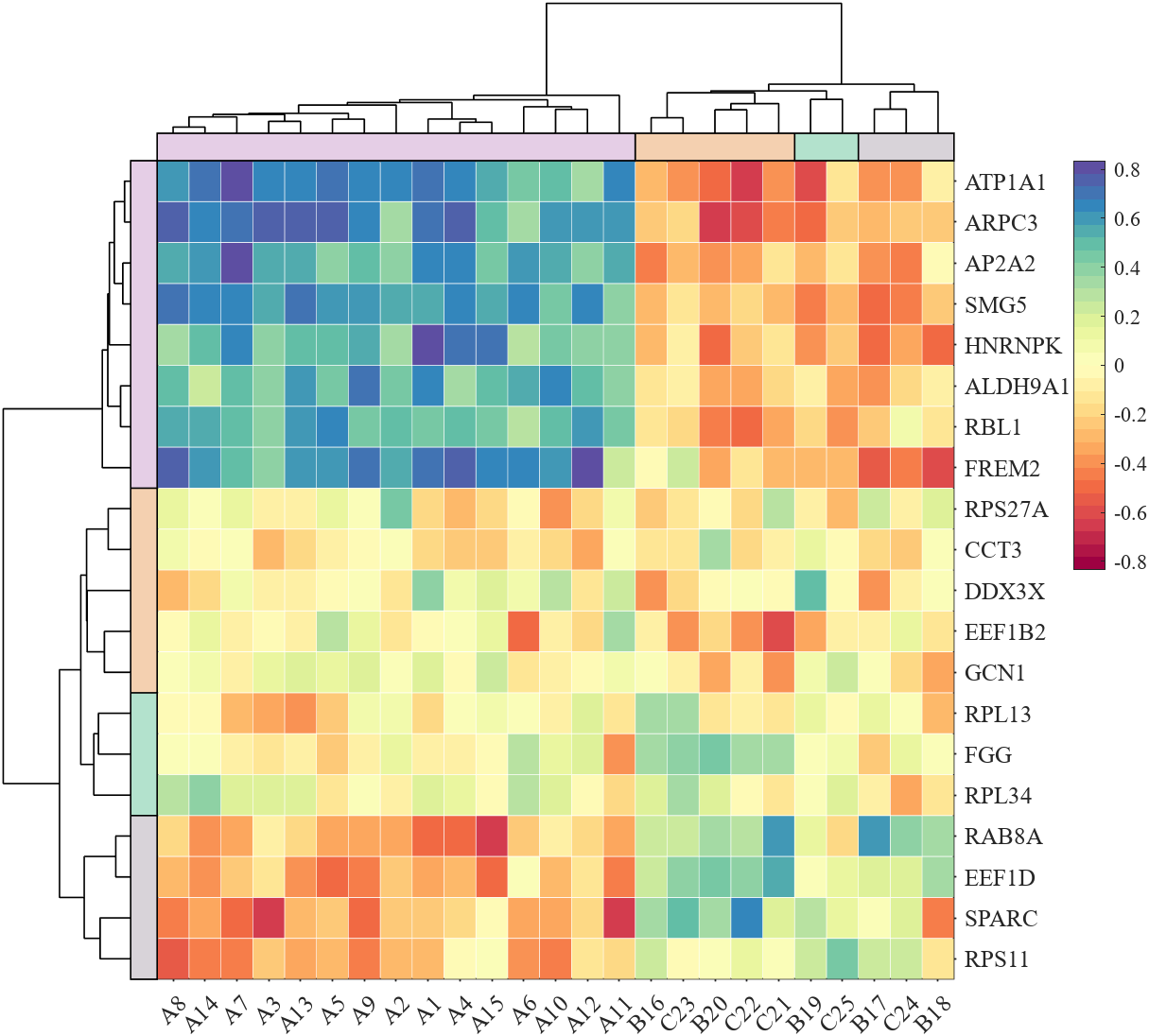
8 带树状图热图
有点麻烦但一点点画吧,需要用到SDendrogram函数,这个函数最后会给出,这个函数有三个可用的参数:
'Orientation’横向树状图还是竖着,'Parent’画在哪个坐标区域,'Method’聚类方法,返回值是新的排序:
% 随便捏造了点数据(Made up some data casually)
X1=randn(20,20)+[(linspace(-1,2.5,20)').*ones(1,8),(linspace(.5,-.7,20)').*ones(1,5),(linspace(.9,-.2,20)').*ones(1,7)];
X2=randn(20,25)+[(linspace(-1,2.5,20)').*ones(1,10),(linspace(.5,-.7,20)').*ones(1,8),(linspace(.9,-.2,20)').*ones(1,7)];
% 求相关系数矩阵(Get the correlation matrix)
Data=corr(X1,X2);
% rowName and colName
rowName={'FREM2','ALDH9A1','RBL1','AP2A2','HNRNPK','ATP1A1','ARPC3','SMG5','RPS27A',...'RAB8A','SPARC','DDX3X','EEF1D','EEF1B2','RPS11','RPL13','RPL34','GCN1','FGG','CCT3'};
colName={'A1','A2','A3','A4','A5','A6','A7','A8','A9','A10','B11','B12','B13',...'B14','B15','B16','B17','B18','C19','C20','C21','C22','C23','C24','C25'};% 图窗创建(create figure)
fig=figure('Position',[100,100,870,720]);% 调整主坐标区域位置并将Y轴置于右侧
% Adjust the position of the main coordinate area
% and place the Y axis to the right
axMain=axes('Parent',fig);
axMain.Position=[.18,.07,.62,.77];
P=axMain.Position;
axMain.YAxisLocation='right';% 绘制左侧树状图(Draw the left dendrogram)
axTreeL=axes('Parent',fig);
axTreeL.Position=[P(1)-P(3)/5,P(2),P(3)/5,P(4)];
orderL=SDendrogram(Data,'Orientation','left','Parent',axTreeL);% 绘制顶部树状图(Draw the top dendrogram)
axTreeT=axes('Parent',fig);
axTreeT.Position=[P(1),P(2)+P(4),.62,P(4)/5];
orderT=SDendrogram(Data,'Orientation','top','Parent',axTreeT);% 交换数据顺序(Exchange data order)
Data=Data(orderL,:);
Data=Data(:,orderT);% 绘制热图(Draw Heatmap)
SHM_t1=SHeatmap(Data,'Format','sq','Parent',axMain);
SHM_t1=SHM_t1.draw();
axMain.DataAspectRatioMode='auto';
axMain.XTickLabel=colName(orderT);
axMain.YTickLabel=rowName(orderL);
CB=colorbar(axMain);
CB.Position=[P(1)+P(3)*1.15,P(2)+P(4)/2,P(3)/25,P(4)/2];
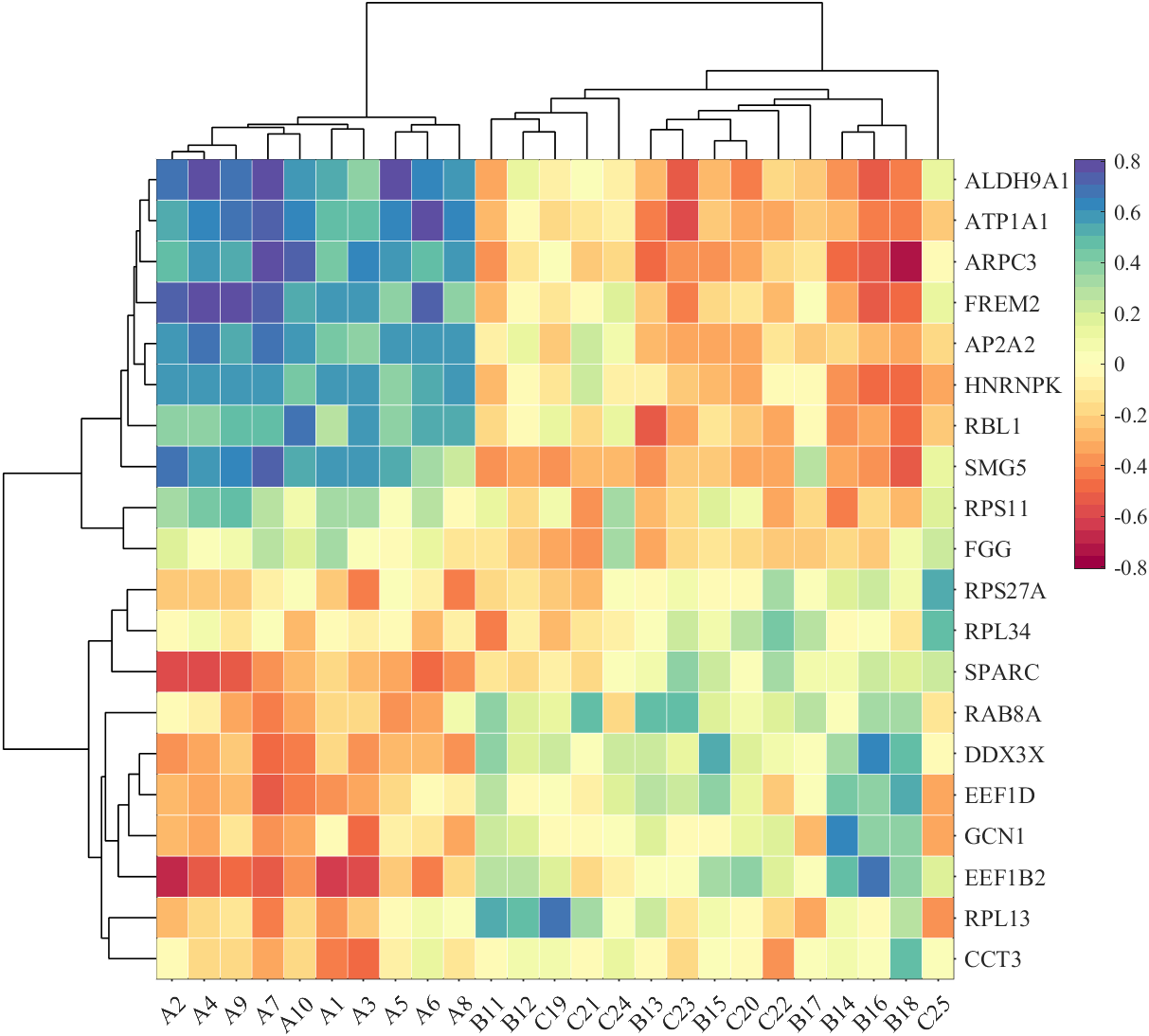
9 分组热图
需要使用SClusterBlock函数,主要的参数有:
'Orientation’横向还是竖着,'MinLim’绘制的位置下限,'Parent’画在哪个坐标区域,'ColorList’配色列表,返回值X,Y是每一个块的中心坐标,为了方便之后添加文本:
% 随便捏造了点数据(Made up some data casually)
ClassCol=[1,1,1,1,2,1,2,2,2,2,3,3,3,3,3,4,4,4,4,4,5,5,5,5,5];
ClassRow=[1,1,1,1,1,2,2,2,2,2,3,3,3,3,3,4,4,4,4,4];
Data=rand(20,25);% 图窗创建(create figure)
fig=figure('Position',[100,100,800,800]);% 调整主坐标区域位置并将Y轴置于右侧
% Adjust the position of the main coordinate area
% and place the Y axis to the right
axMain=axes('Parent',fig);
axMain.Position=[.1,.05,.85,.85];
P=axMain.Position;
axMain.YAxisLocation='right';% 绘制左侧分组方块(Draw the left Block)
axBlockL=axes('Parent',fig);
axBlockL.Position=[P(1)-P(3)/20-P(3)*.01,P(2),P(3)/20,P(4)];
SClusterBlock(ClassRow,'Orientation','left','Parent',axBlockL);% 绘制上侧分组方块(Draw the top Block)
axBlockT=axes('Parent',fig);
axBlockT.Position=[P(1),P(2)+P(4)*1.01,P(3),P(4)/20];
SClusterBlock(ClassCol,'Orientation','top','Parent',axBlockT);% 绘制热图(Draw Heatmap)
SHM_b1=SHeatmap(Data,'Format','sq','Parent',axMain);
SHM_b1=SHM_b1.draw();
axMain.DataAspectRatioMode='auto';
colorbar(axMain,'off');
clim(axMain,[-.2,1])

10 多层分组热图
绘制多次的同时改一下MinLim属性,同时下面这个例子利用了返回值填上了标签:
Data=rand(3,16);Class1=[1,1,1,1,2,2,2,2,3,3,3,3,4,4,4,4];
Class2=[1,2,3,4,1,2,3,4,1,2,3,4,1,2,3,4];
ClassName1={'AAAAA','BBBBB','CCCCC','DDDDD'};
ClassName2={'A1','A2','A3','A4','B1','B2','B3','B4','C1','C2','C3','C4','D1','D2','D3','D4'};% 设置颜色(Set Color)
CList1=[0.7020    0.8863    0.80390.9559    0.8142    0.69070.8451    0.8275    0.85100.8966    0.8083    0.9000];
CList2=[0.4588    0.4196    0.69410.6196    0.6039    0.78430.7373    0.7412    0.86270.8549    0.8549    0.9216];% 图窗及坐标区域创建(create figure and axes)
fig=figure('Position',[100,100,1000,320]);
axMain=axes('Parent',fig);
axMain.Position=[.05,0,.9,.78];
P=axMain.Position;% Draw Heatmap
SHM5=SHeatmap(Data,'Format','sq','Parent',axMain);
SHM5=SHM5.draw();
CB=colorbar;
CB.Location='southoutside';
axMain.DataAspectRatioMode='auto';% Draw Block
axBlockT=axes('Parent',fig);
axBlockT.Position=[P(1),P(2)+P(4)*1.05,P(3),P(4)/5];
[X1,Y1]=SClusterBlock(Class1,'Orientation','top','Parent',axBlockT,'MinLim',1,'ColorList',CList1);
[X2,Y2]=SClusterBlock(Class2,'Orientation','top','Parent',axBlockT,'ColorList',CList2);% text
for i=1:length(X1)text(axBlockT,X1(i),Y1(i),ClassName1{i},'FontSize',17,'HorizontalAlignment','center','FontName','Cambria')
end
for i=1:length(X2)text(axBlockT,X2(i),Y2(i),ClassName2{i},'FontSize',17,'HorizontalAlignment','center','FontName','Cambria')
end

11 树图+分组
大家可以自行改变聚类方法及分类数量:
% 随便捏造了点数据(Made up some data casually)
X1=randn(20,20)+[(linspace(-1,2.5,20)').*ones(1,8),(linspace(.5,-.7,20)').*ones(1,5),(linspace(.9,-.2,20)').*ones(1,7)];
X2=randn(20,25)+[(linspace(-1,2.5,20)').*ones(1,15),(linspace(.5,-.7,20)').*ones(1,5),(linspace(.9,-.2,20)').*ones(1,5)];
% 求相关系数矩阵(Get the correlation matrix)
Data=corr(X1,X2);
% rowName and colName
rowName={'FREM2','ALDH9A1','RBL1','AP2A2','HNRNPK','ATP1A1','ARPC3','SMG5','RPS27A',...'RAB8A','SPARC','DDX3X','EEF1D','EEF1B2','RPS11','RPL13','RPL34','GCN1','FGG','CCT3'};
colName={'A1','A2','A3','A4','A5','A6','A7','A8','A9','A10','A11','A12','A13',...'A14','A15','B16','B17','B18','B19','B20','C21','C22','C23','C24','C25'};
% Set Color
CList=[0.7020    0.8863    0.80390.9559    0.8142    0.69070.8451    0.8275    0.85100.8966    0.8083    0.9000];% 图窗创建(create figure)
fig=figure('Position',[100,100,870,720]);% 调整主坐标区域位置并将Y轴置于右侧
% Adjust the position of the main coordinate area
% and place the Y axis to the right
axMain=axes('Parent',fig);
axMain.Position=[.18,.07,.62,.77];
P=axMain.Position;
axMain.YAxisLocation='right';% 绘制左侧树状图(Draw the left dendrogram)
axTreeL=axes('Parent',fig);
axTreeL.Position=[P(1)-P(3)/5,P(2),P(3)/5*(5/6),P(4)];
orderL=SDendrogram(Data,'Orientation','left','Parent',axTreeL,'Method','average');% 绘制顶部树状图(Draw the top dendrogram)
axTreeT=axes('Parent',fig);
axTreeT.Position=[P(1),P(2)+P(4)+P(4)/5*(1/6),P(3),P(4)/5*(5/6)];
orderT=SDendrogram(Data,'Orientation','top','Parent',axTreeT,'Method','average');% 绘制左侧分组方块(Draw the left Block)
axBlockL=axes('Parent',fig);
axBlockL.Position=[P(1)-P(3)/5+P(3)/5*(5/6),P(2),P(3)/5*(1/6),P(4)];
ZL=linkage(Data,'average');
CL=cluster(ZL,'Maxclust',4);
CL=CL(orderL);
SClusterBlock(CL,'Orientation','left','Parent',axBlockL,'ColorList',CList);% 绘制顶部分组方块(Draw the top Block)
axBlockT=axes('Parent',fig);
axBlockT.Position=[P(1),P(2)+P(4),P(3),P(4)/5*(1/6)];
ZT=linkage(Data.','average');
CT=cluster(ZT,'Maxclust',4);
CT=CT(orderT);
SClusterBlock(CT,'Orientation','top','Parent',axBlockT,'ColorList',CList);% 交换数据顺序(Exchange data order)
Data=Data(orderL,:);
Data=Data(:,orderT);% 绘制热图(Draw Heatmap)
SHM_t1=SHeatmap(Data,'Format','sq','Parent',axMain);
SHM_t1=SHM_t1.draw();
axMain.DataAspectRatioMode='auto';
axMain.XTickLabel=colName(orderT);
axMain.YTickLabel=rowName(orderL);
CB=colorbar(axMain);
CB.Position=[P(1)+P(3)*1.15,P(2)+P(4)/2,P(3)/25,P(4)/2];
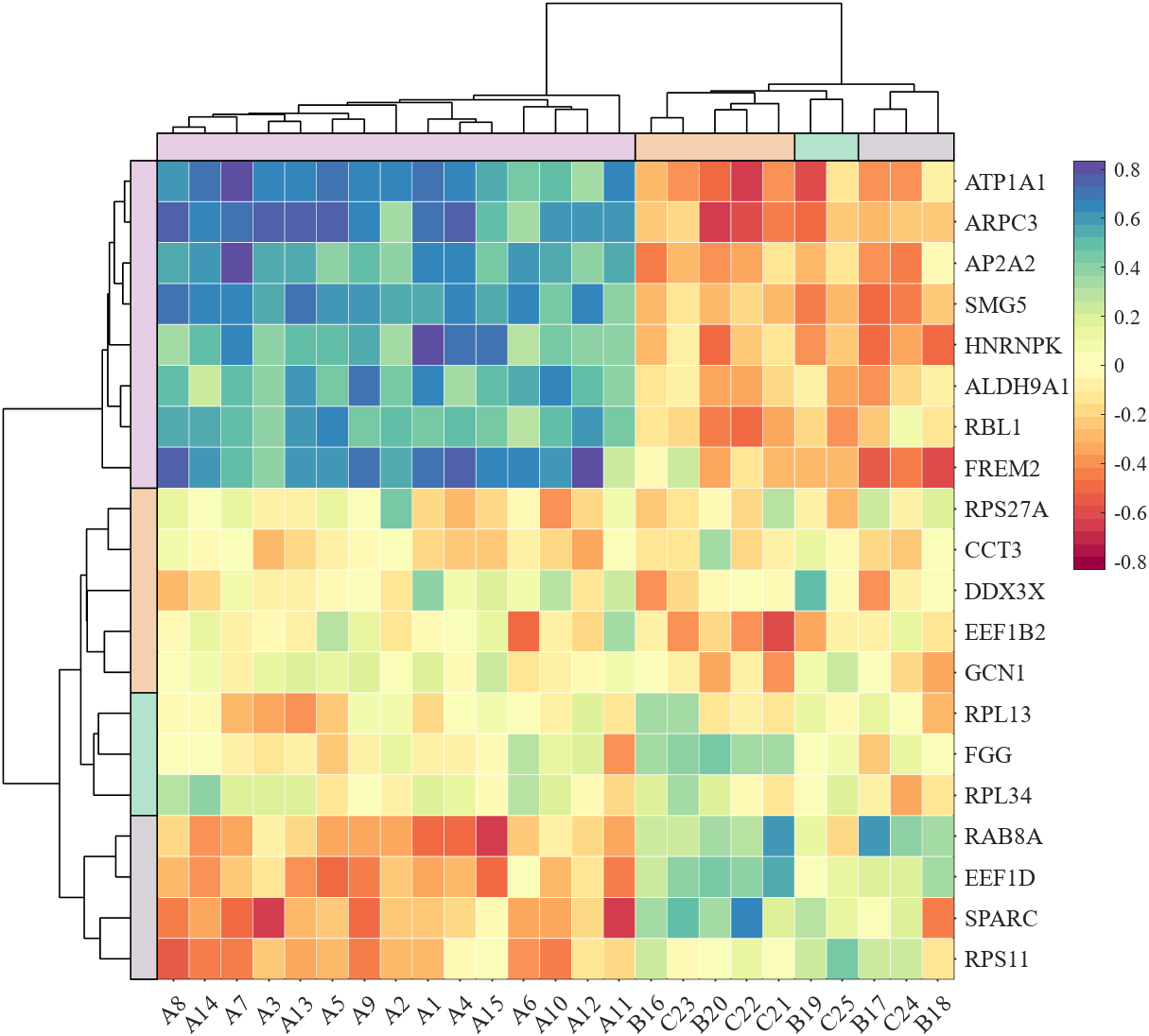
旧功能的新代码
把代码增添了大量注释:
1 基础使用
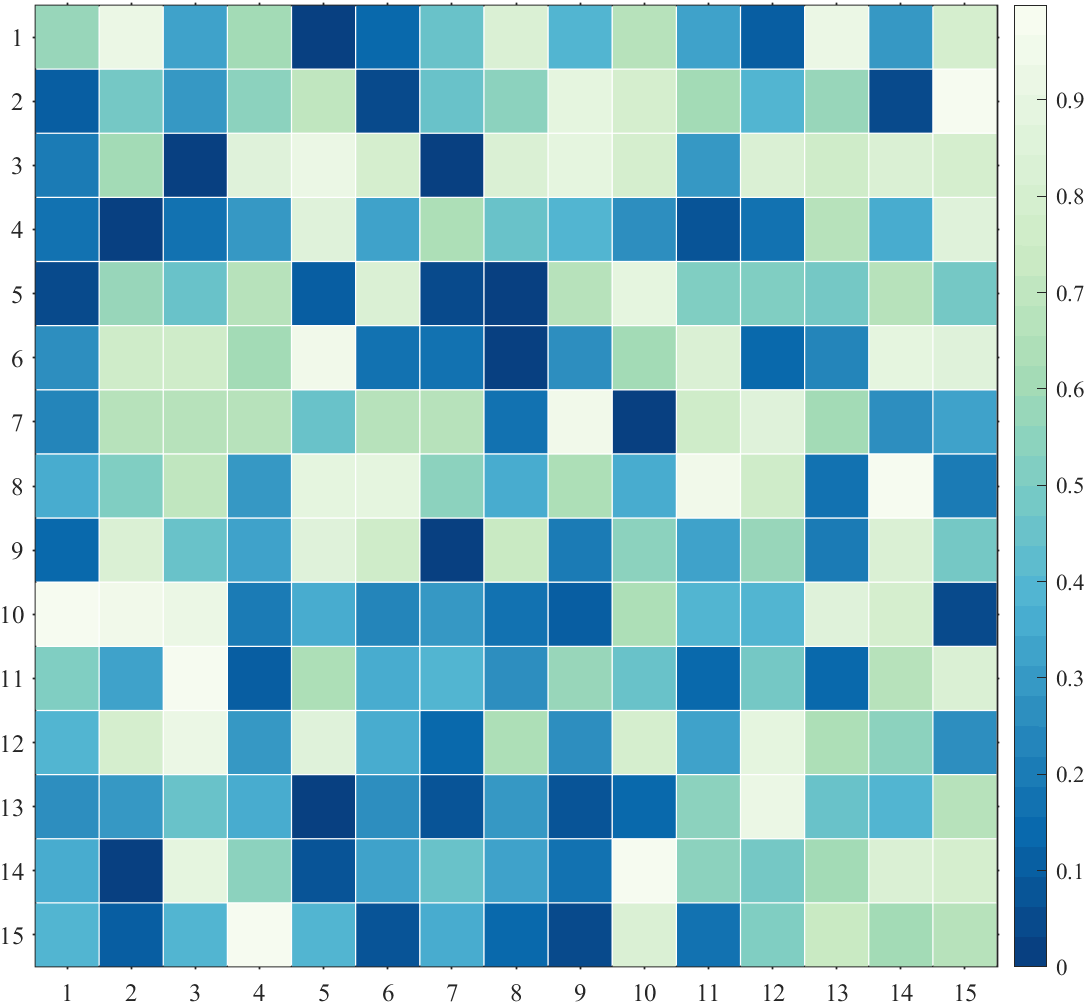
%% 绘制无负数的热图(Draw positive heat map)
figure()
Data=rand(15,15);
SHM1=SHeatmap(Data,'Format','sq');
SHM1=SHM1.draw();
% exportgraphics(gca,'gallery\Basic_positive.png')%% 绘制有负数热图(Contains negative numbers)
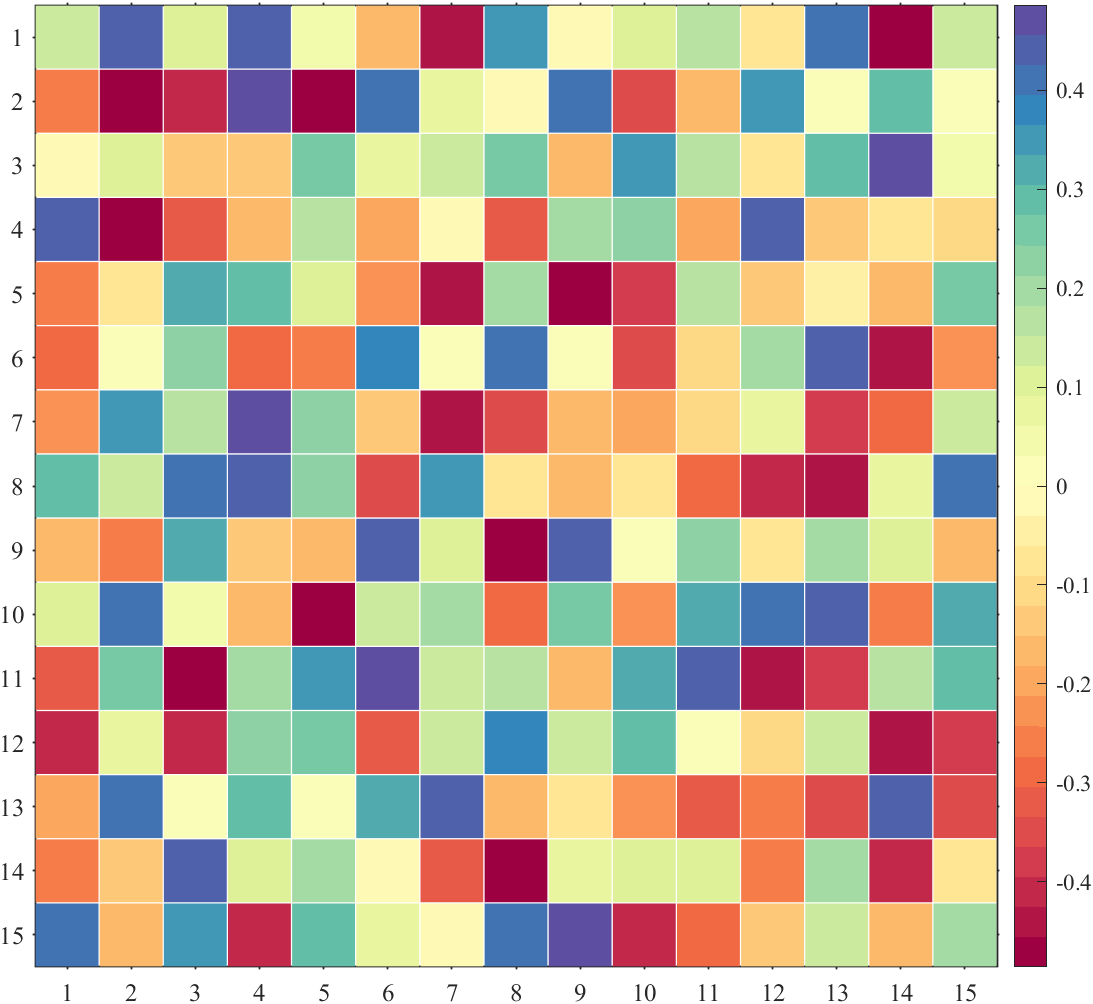
figure()
Data=rand(15,15)-.5;
SHM2=SHeatmap(Data,'Format','sq');
SHM2=SHM2.draw();
% exportgraphics(gca,'gallery\Basic_negative.png')%% 绘制不同大小热图(Draw heat maps of different sizes)
figure()
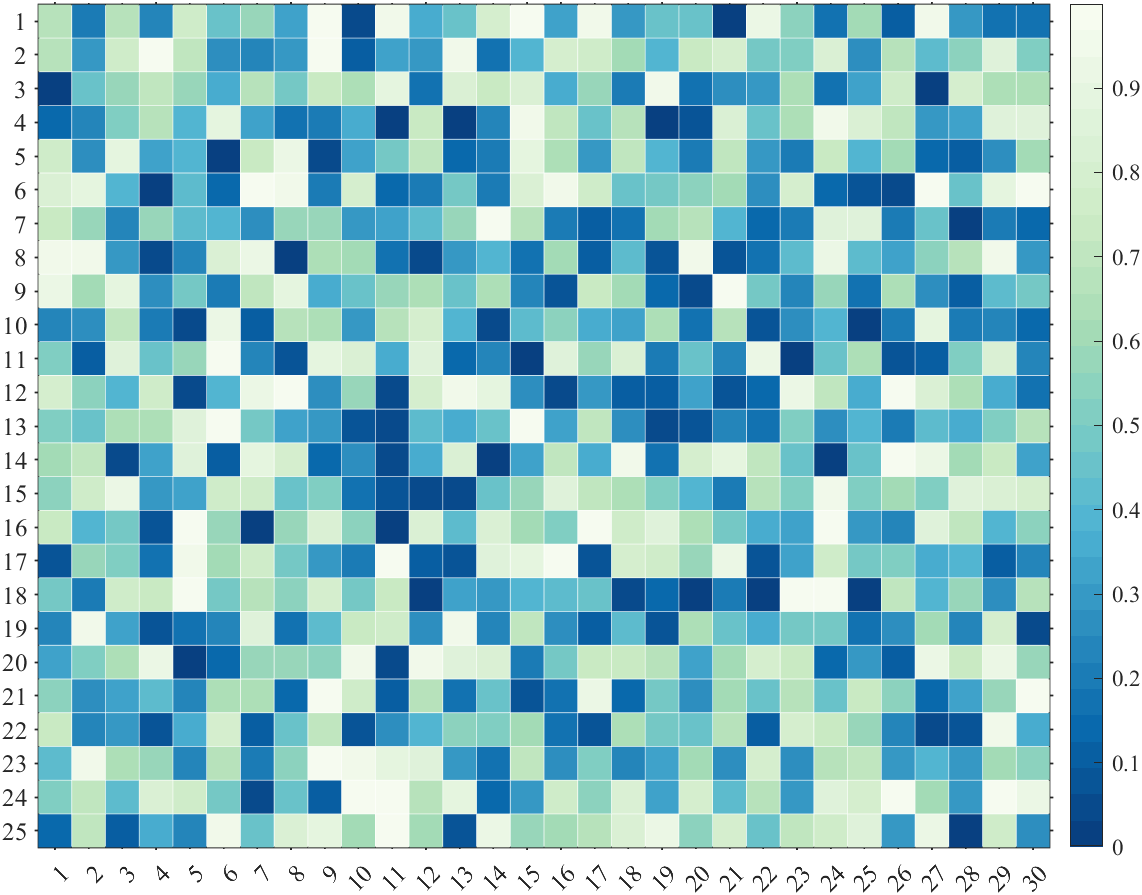
Data=rand(25,30);
SHM4=SHeatmap(Data,'Format','sq');
SHM4=SHM4.draw();
% exportgraphics(gca,'gallery\Basic_25_30.png')%% 调整colorbar位置(Adjust the colorbar Location)
figure()
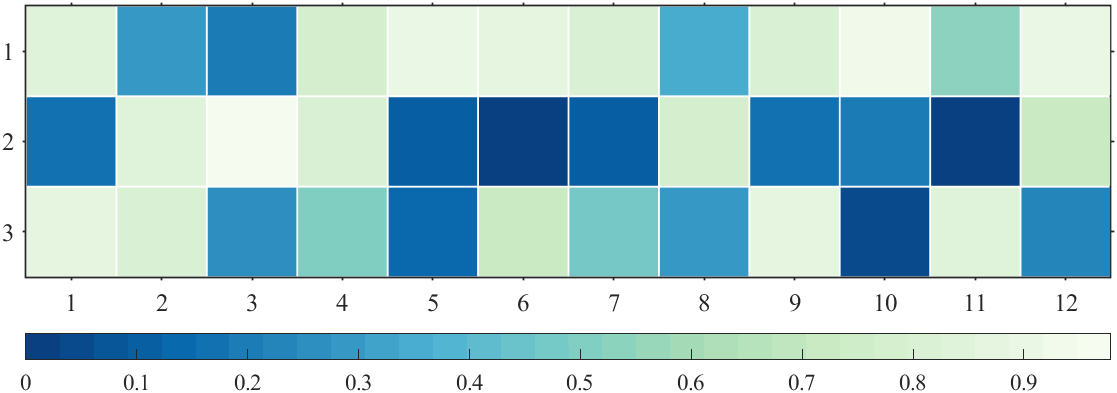
Data=rand(3,12);
SHM5=SHeatmap(Data,'Format','sq');
SHM5=SHM5.draw();
CB=colorbar;
CB.Location='southoutside';
% exportgraphics(gca,'gallery\Basic_colorbar_location.png')%% 绘制有NaN热图(Draw heat map with NaN)
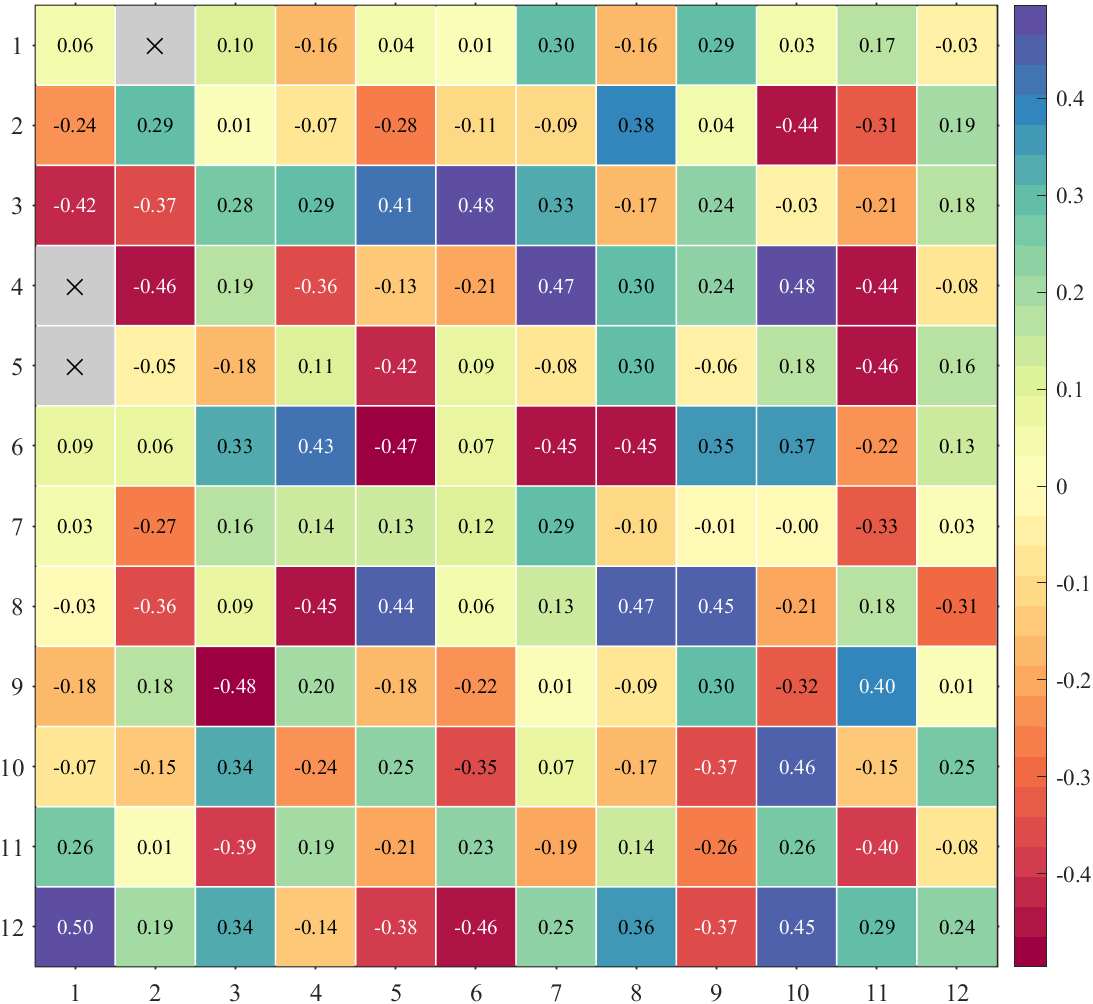
figure()
Data=rand(12,12)-.5;
Data([4,5,13])=nan;
SHM6=SHeatmap(Data,'Format','sq');
SHM6=SHM6.draw();
% exportgraphics(gca,'gallery\Basic_with_NaN.png')%% 绘制有文本热图(Draw heat map with texts)
figure()
Data=rand(12,12)-.5;
Data([4,5,13])=nan;
SHM7=SHeatmap(Data,'Format','sq');
SHM7=SHM7.draw();
SHM7.setText();
% exportgraphics(gca,'gallery\Basic_with_text.png')%% 绘制带标签热图(Draw heat map with labels)
figure()
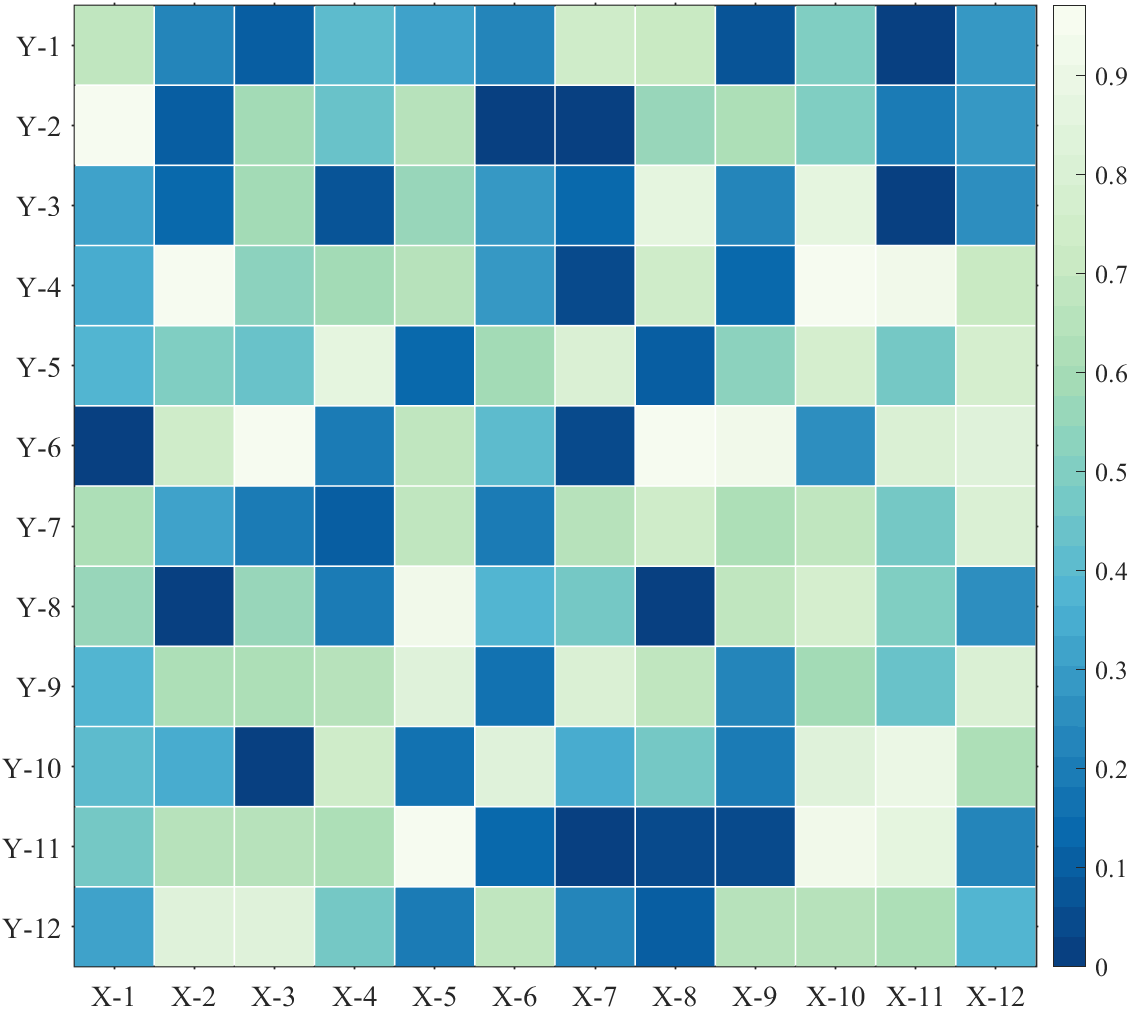
Data=rand(12,12);
SHM8=SHeatmap(Data,'Format','sq');
SHM8=SHM8.draw();
ax=gca;
ax.XTickLabel={'X-1','X-2','X-3','X-4','X-5','X-6','X-7','X-8','X-9','X-10','X-11','X-12'};
ax.YTickLabel={'Y-1','Y-2','Y-3','Y-4','Y-5','Y-6','Y-7','Y-8','Y-9','Y-10','Y-11','Y-12'};
ax.FontSize=14;
% exportgraphics(gca,'gallery\Basic_with_labels.png')
绘制无负数的热图(Draw positive heat map)
绘制有负数热图(Contains negative numbers)
绘制不同大小热图(Draw heat maps of different sizes)
调整colorbar位置(Adjust the colorbar Location)
绘制有NaN热图(Draw heat map with NaN)

绘制有文本热图(Draw heat map with texts)
绘制带标签热图(Draw heat map with labels)
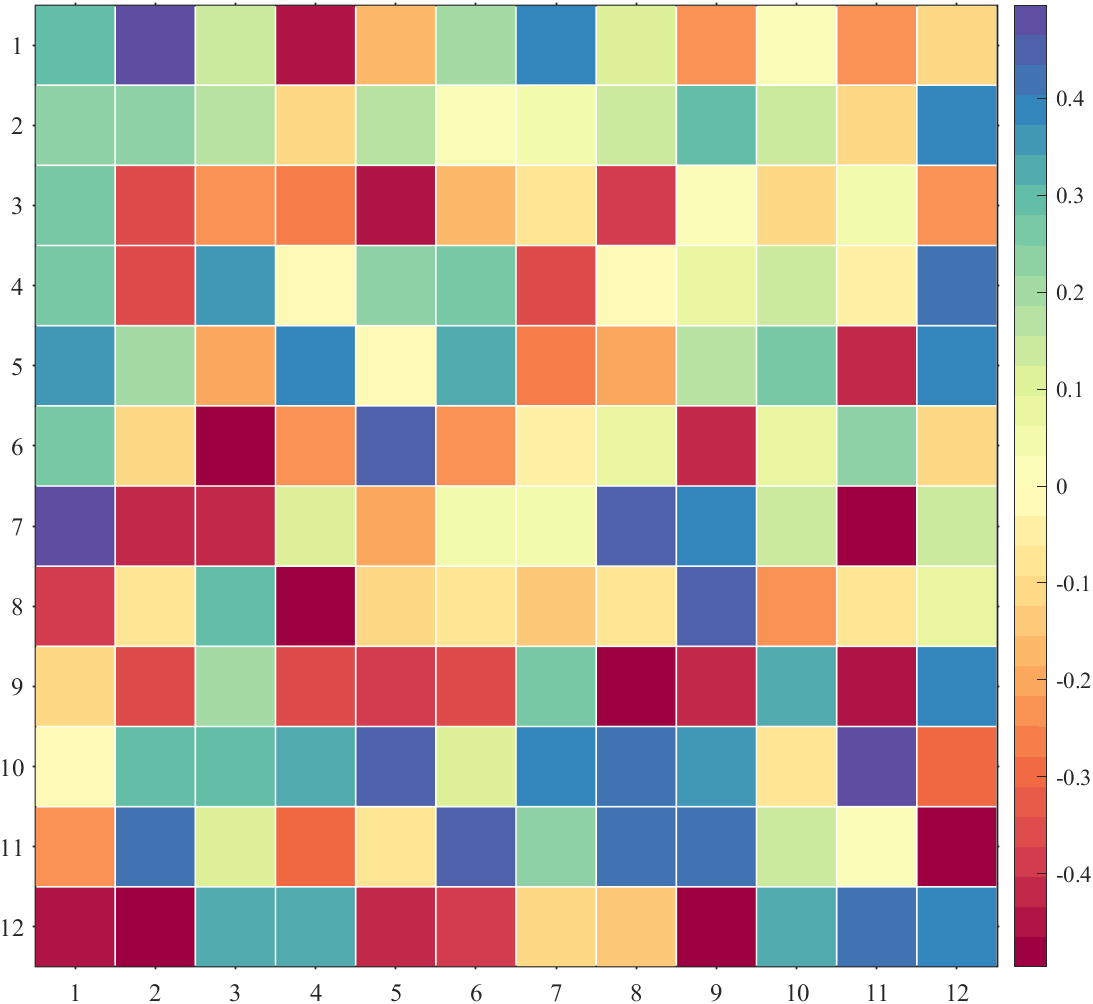
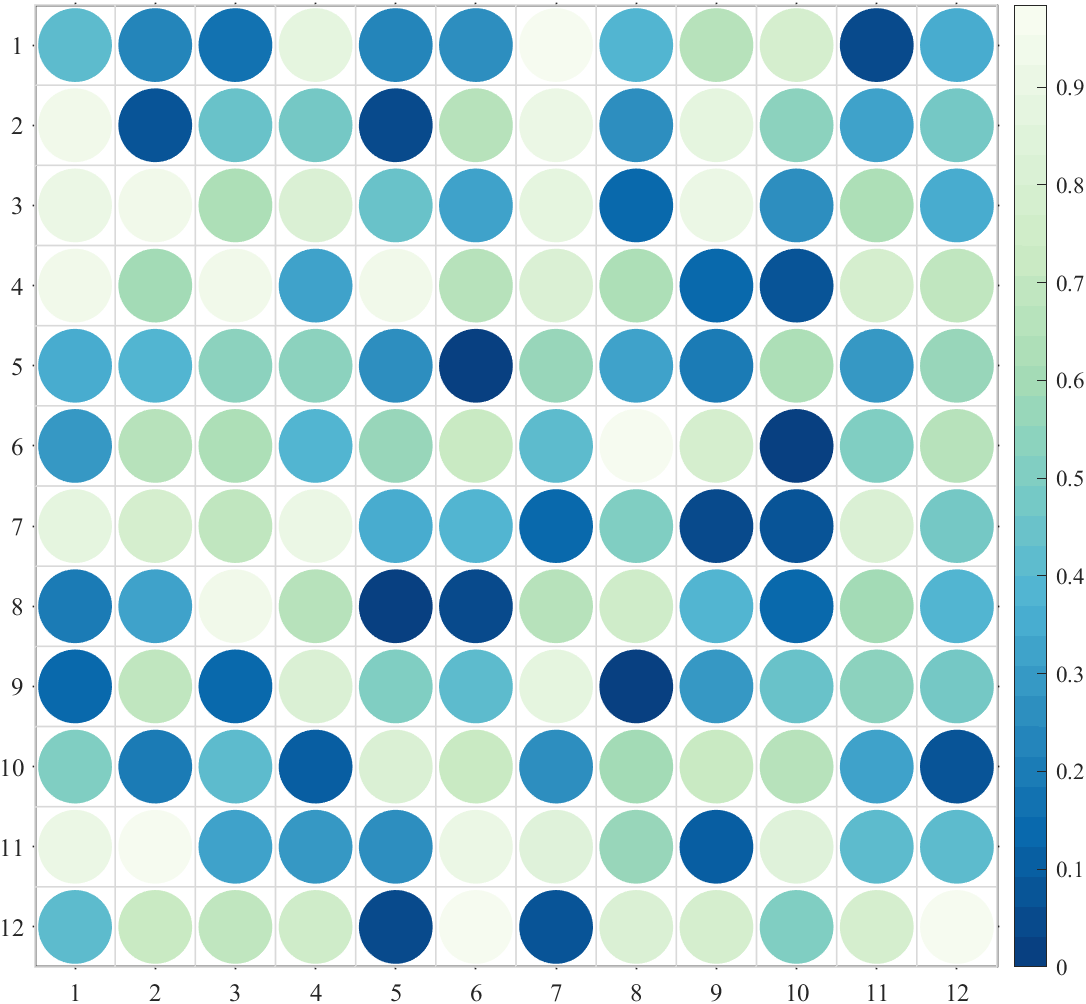
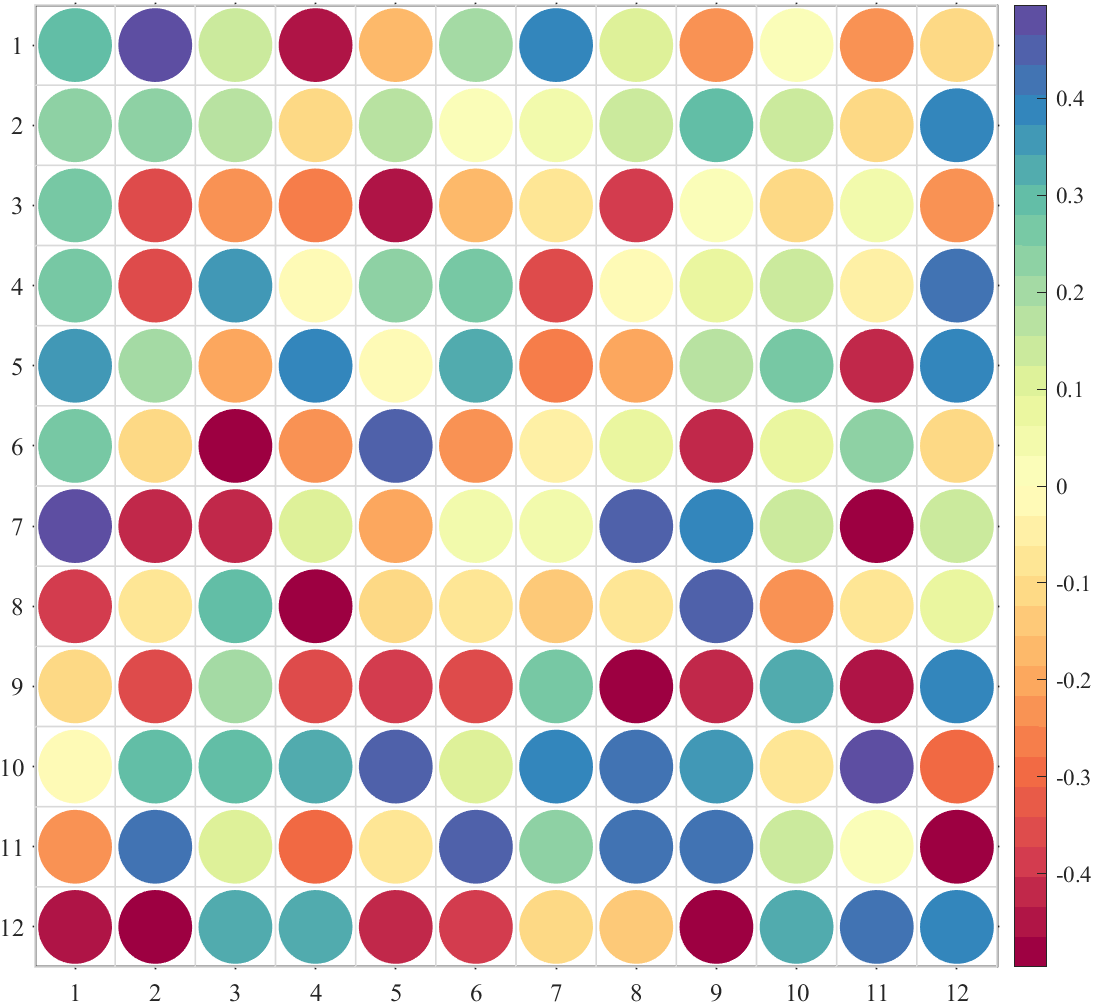
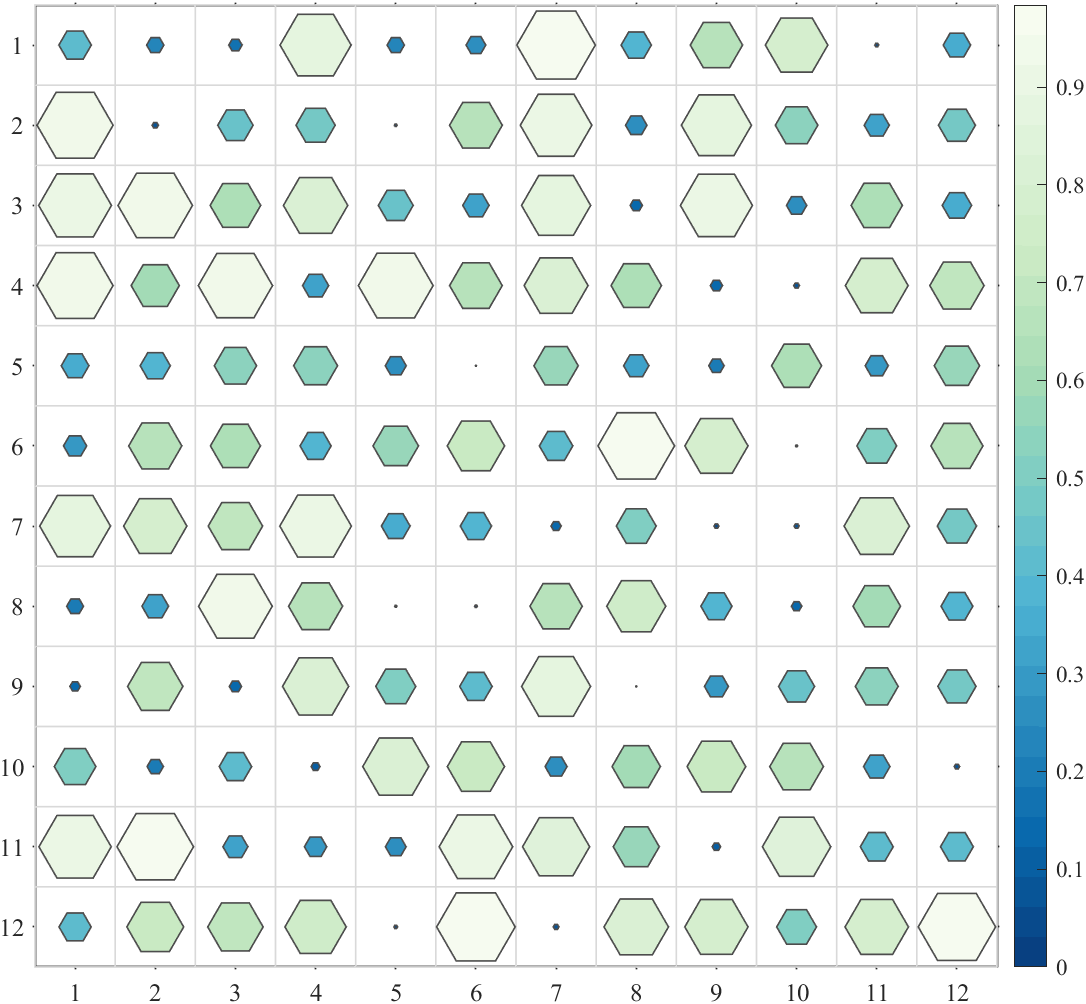
2 方块形状
% sq    : square (default)   : 方形(默认)
% pie   : pie chart          : 饼图
% circ  : circular           : 圆形
% oval  : oval               : 椭圆形
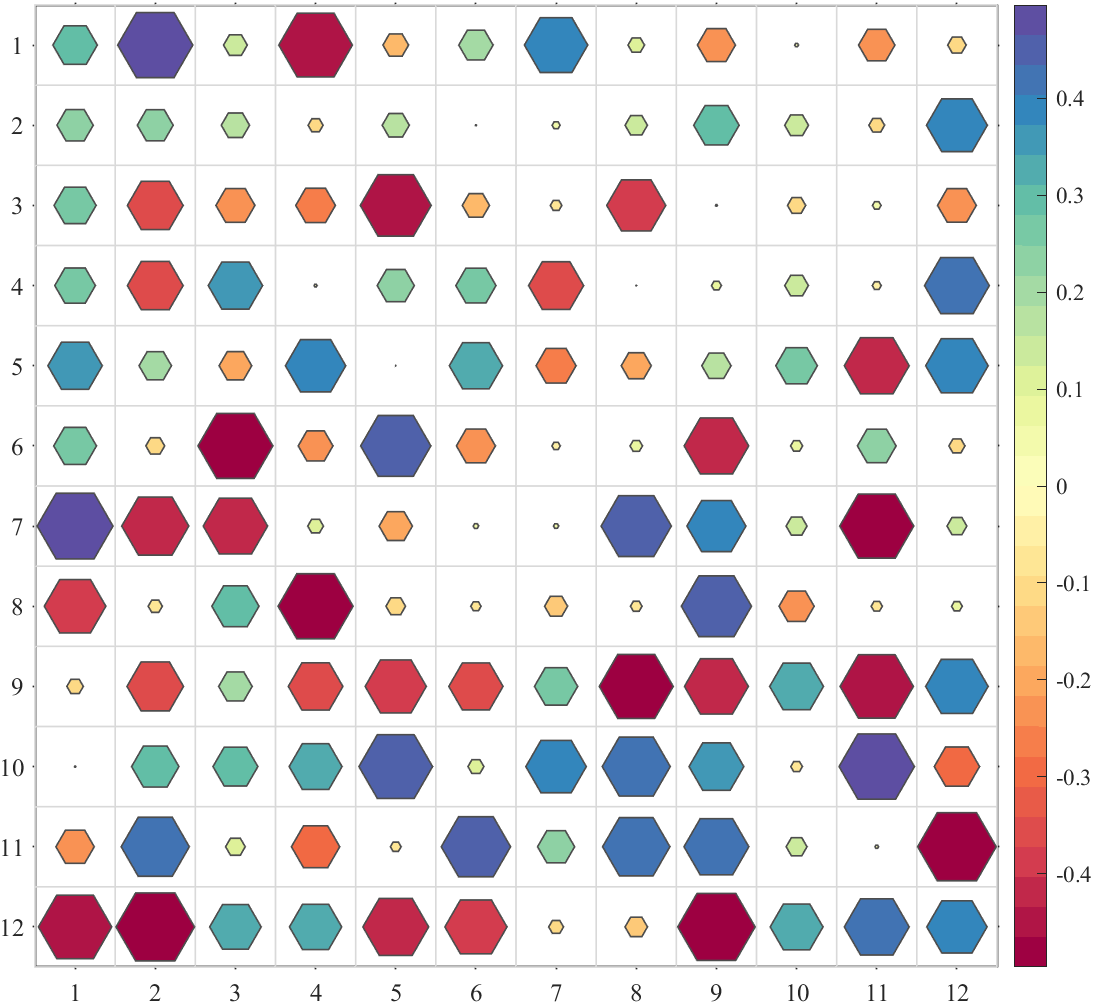
% hex   : hexagon            :六边形
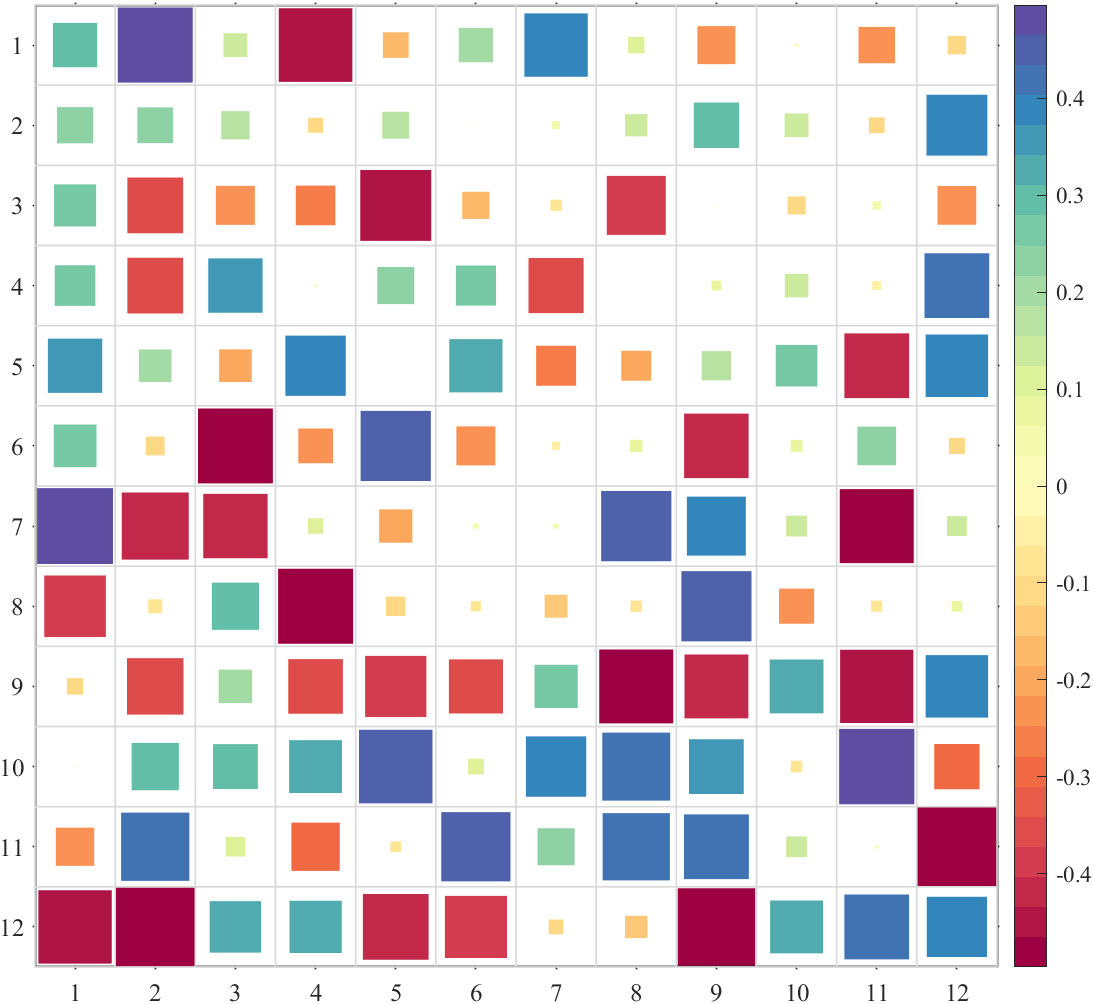
% asq   : auto-size square   :自带调整大小的方形
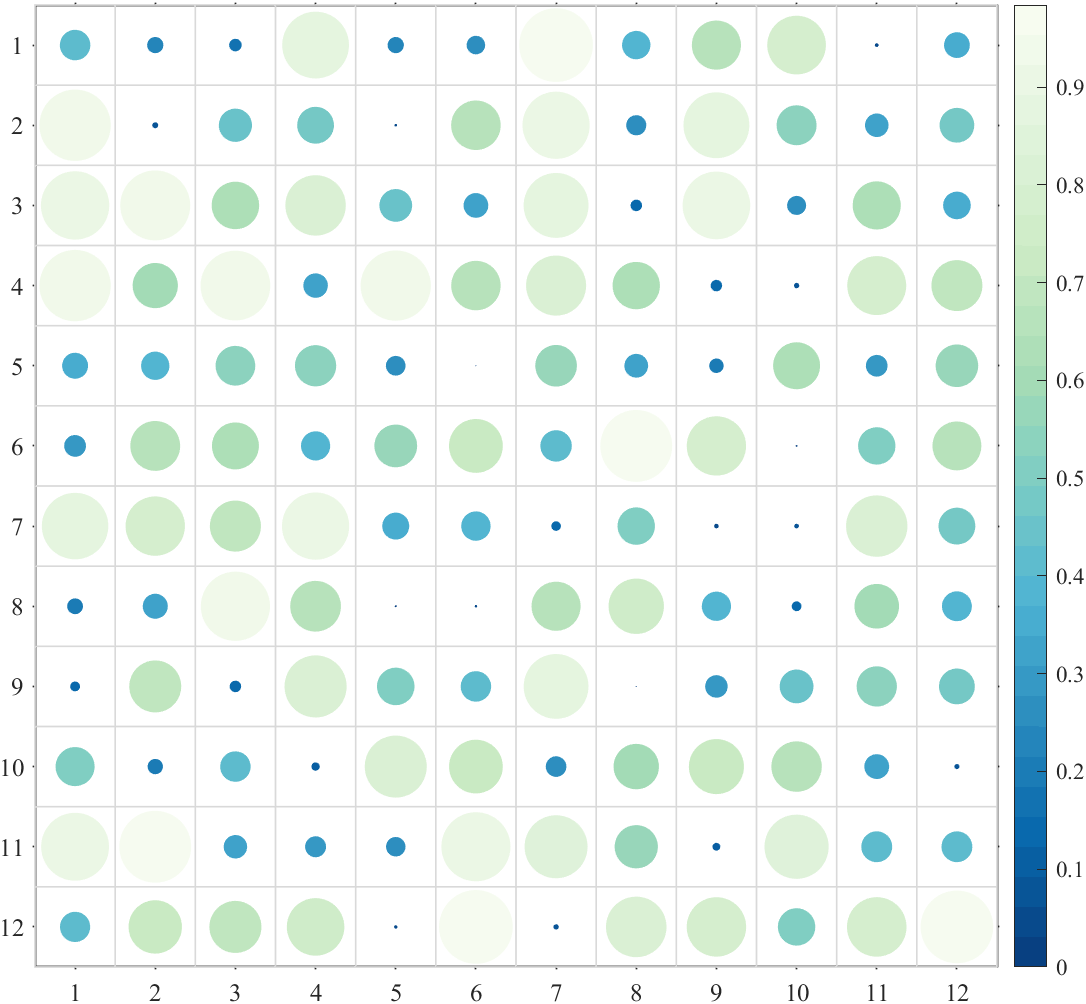
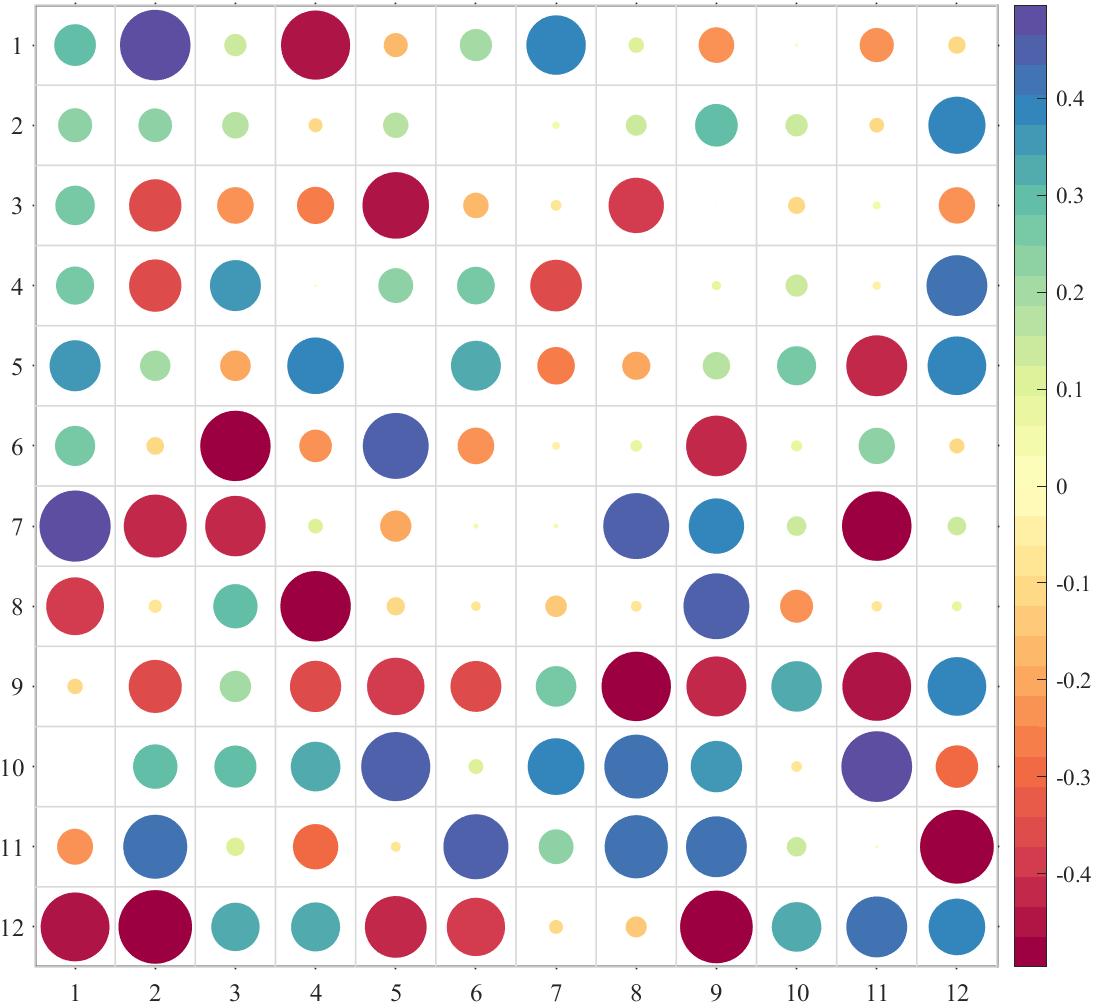
% acirc : auto-size circular :自带调整大小的圆形Format={'sq','pie','circ','oval','hex','asq','acirc'};
A=rand(12,12);
B=rand(12,12)-.5;for i=1:length(Format)% 绘制纯正数热图(Draw positive heat map)figure();SHM_A=SHeatmap(A,'Format',Format{i});SHM_A=SHM_A.draw();% exportgraphics(gca,['gallery\Format_',Type{i},'_A.png']) % 存储图片% 绘制含负数热图(Draw heat map with negative number)figure();SHM_B=SHeatmap(B,'Format',Format{i});SHM_B=SHM_B.draw();% exportgraphics(gca,['gallery\Format_',Type{i},'_B.png']) % 存储图片
end
sq

pie


circ
oval


hex
asq

acirc
3 配色
%% 调整clim(Adjust clim)
% 使用 clim() 或者 caxis() 调整颜色映射范围
% Use function clim() or caxis() to set the CLim
fig=figure('Position',[50,50,1400,700]);
% random data
Data=rand(12,12)-.5;
Data([4,5,13])=nan;
% subplot1
ax1=axes('Parent',fig,'Position',[0+1/40,0,1/2-1/20,1]);
SHM_ax1=SHeatmap(Data,'Format','sq','Parent',ax1);
SHM_ax1=SHM_ax1.draw();
SHM_ax1.setText();
% subplot2 adjust clim
ax2=axes('Parent',fig,'Position',[1/2+1/40,0,1/2-1/20,1]);
SHM_ax2=SHeatmap(Data,'Format','sq','Parent',ax2);
SHM_ax2=SHM_ax2.draw();
clim([-.8,.8])
SHM_ax2.setText();
% exportgraphics(fig,'gallery\Colormap_clim.png')%% 使用MATLAB自带colormap(Use the built-in colormap in MATLAB)
figure()
Data=rand(14,14);
SHM_Bone=SHeatmap(Data,'Format','sq');
SHM_Bone.draw();
colormap(bone)
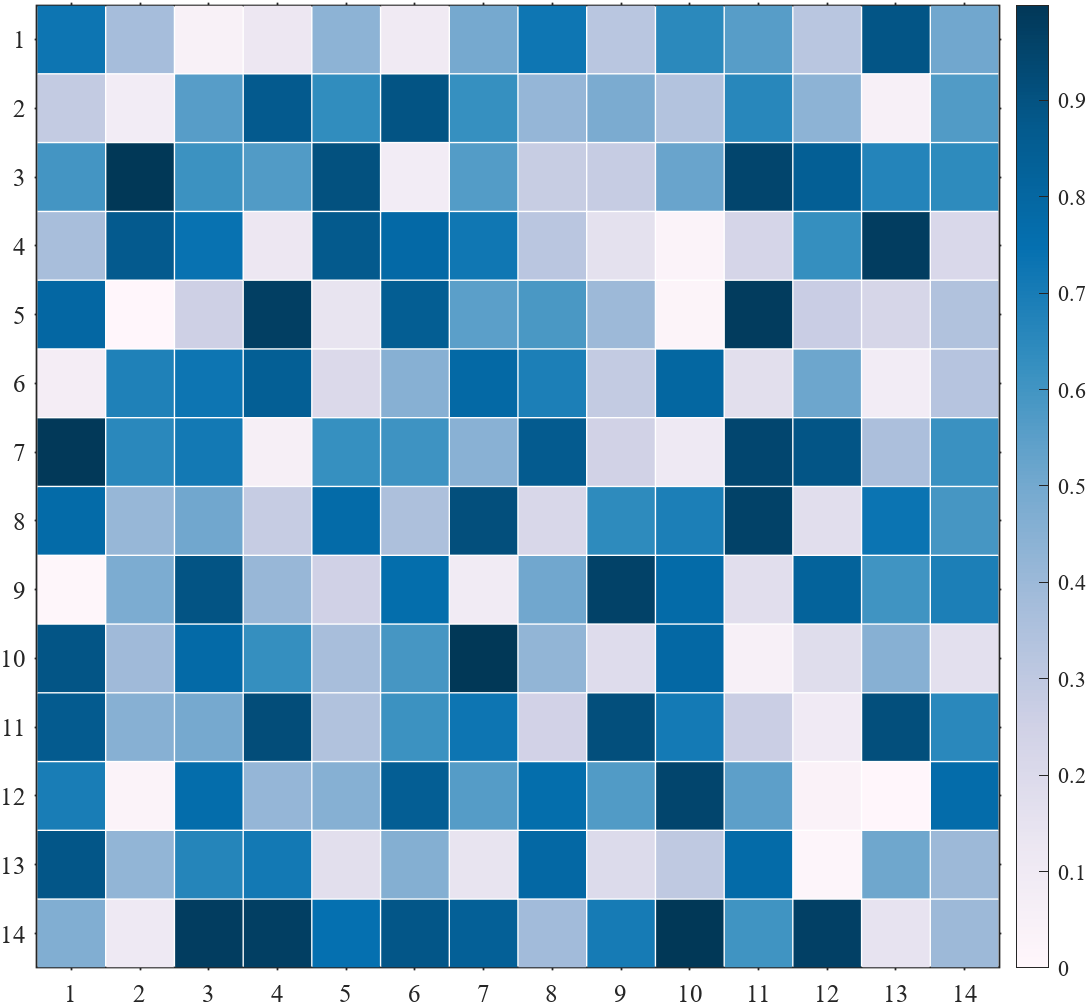
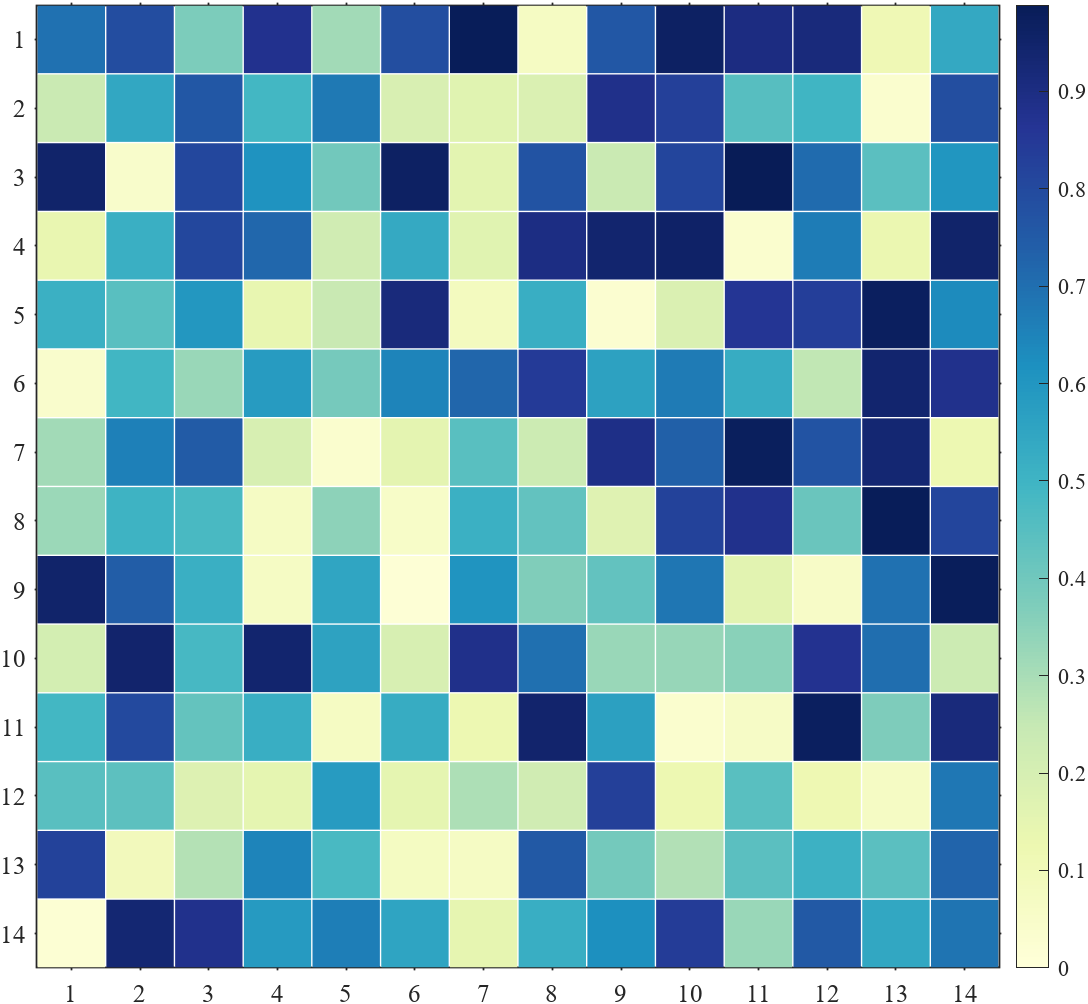
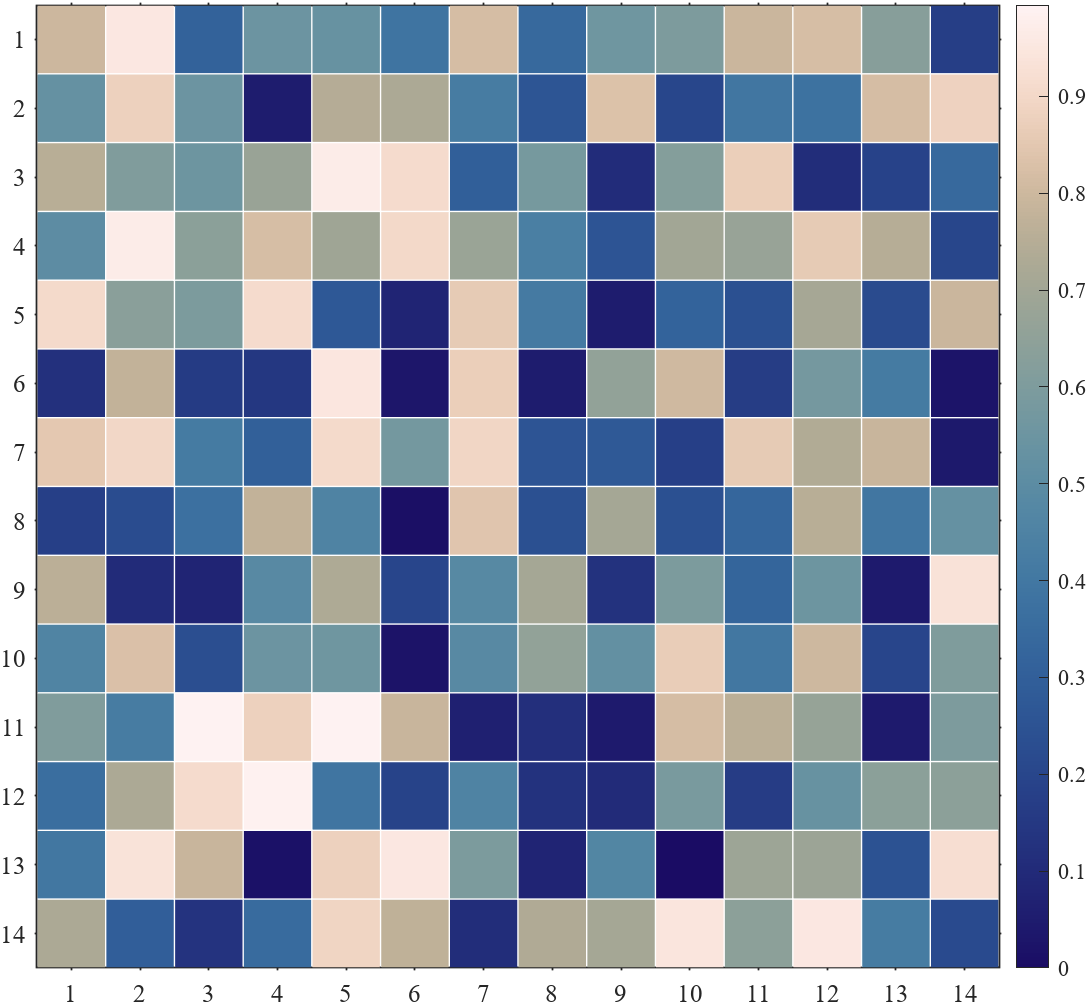
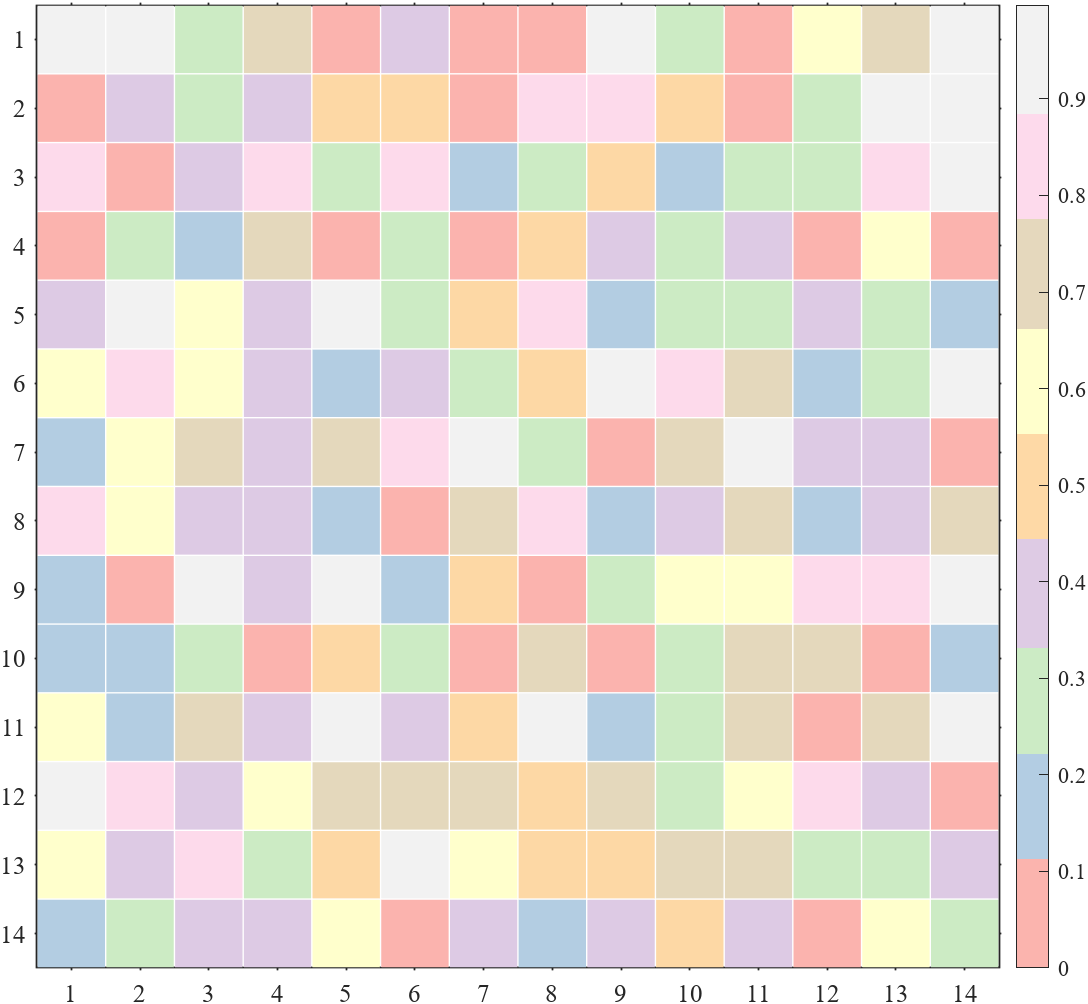
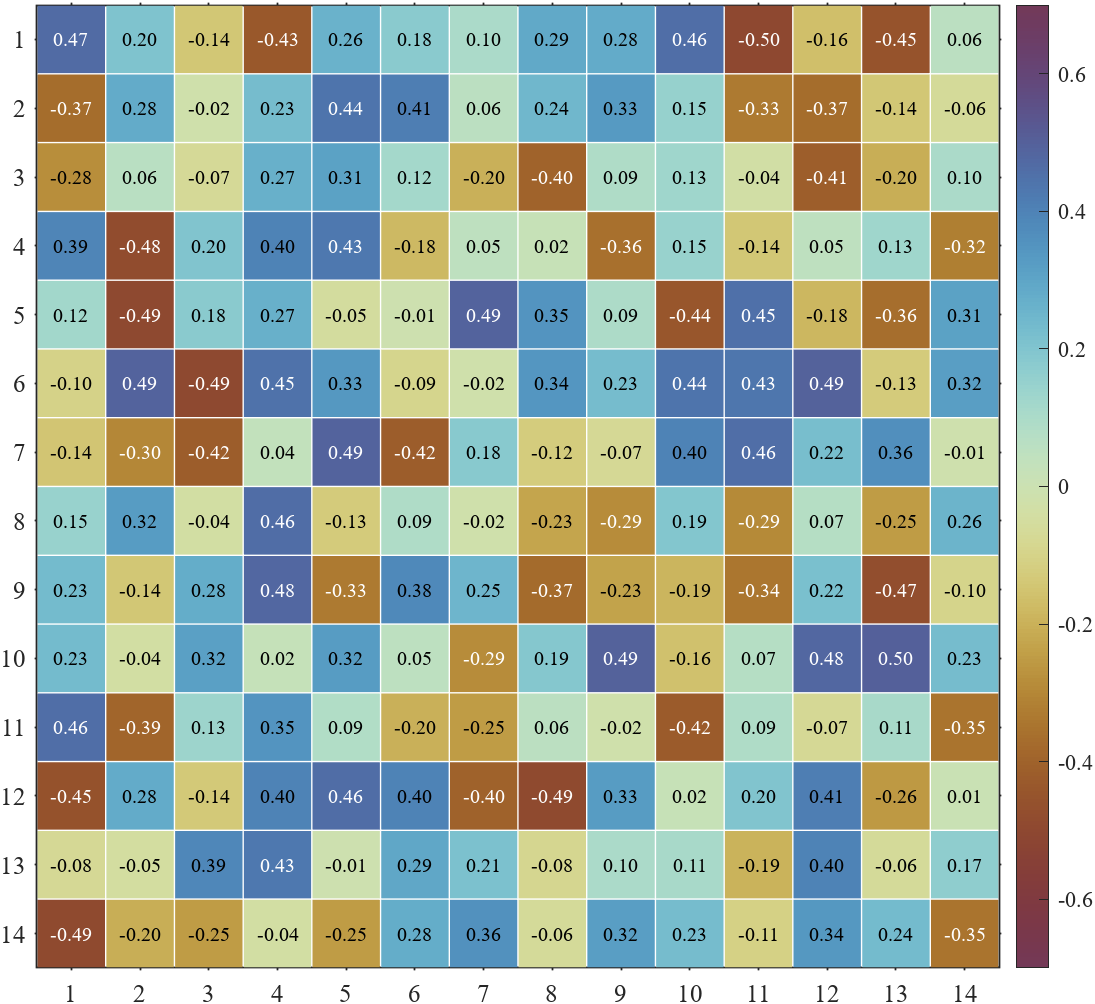
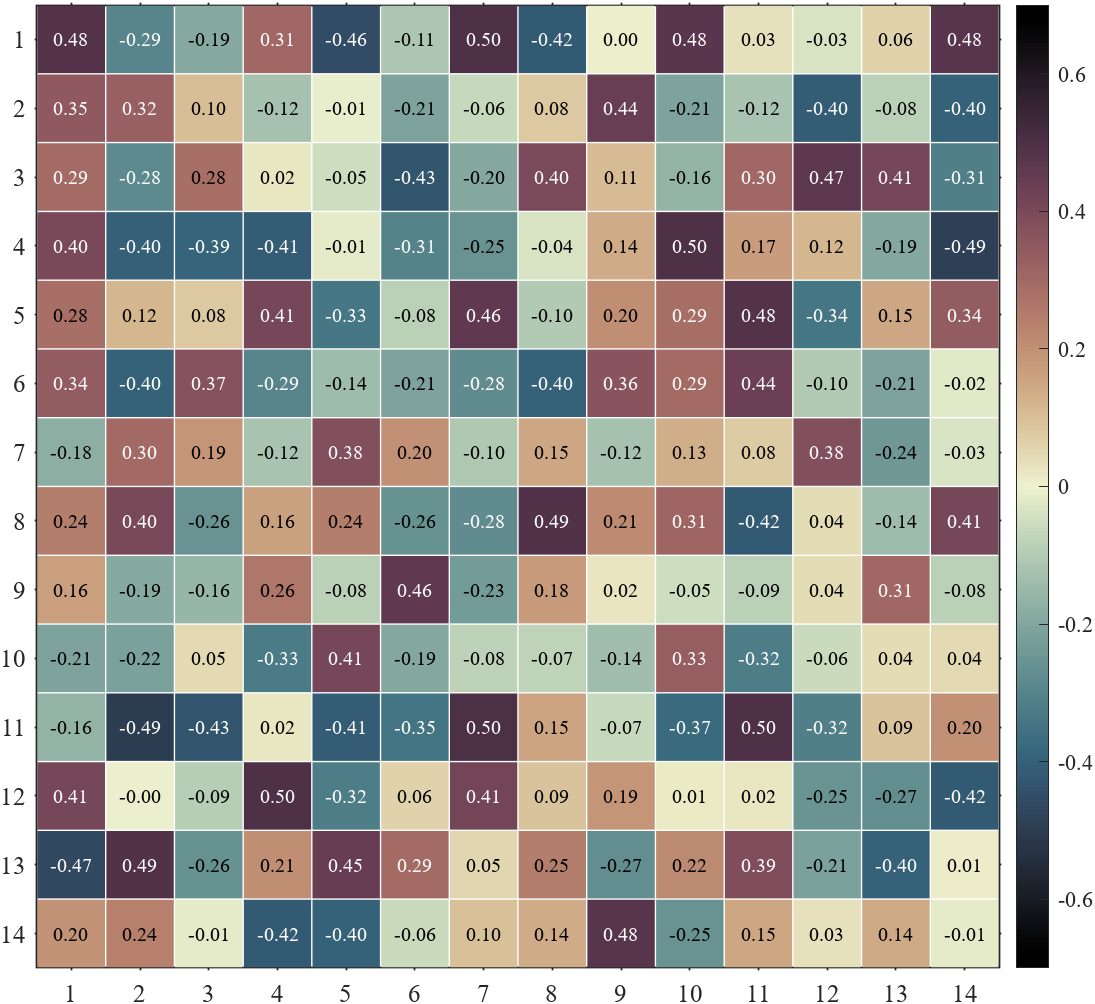
% exportgraphics(gca,'gallery\Colormap_bone.png')%% slanCM(slanCM colormap)
% Zhaoxu Liu / slandarer (2023). 200 colormap
% (https://www.mathworks.com/matlabcentral/fileexchange/120088-200-colormap),
% MATLAB Central File Exchange. 检索来源 2023/3/15.% 单向colormap或离散colormap
for i=[20,21,61,177]figure()Data=rand(14,14);SHM_slan=SHeatmap(Data,'Format','sq');SHM_slan.draw();colormap(slanCM(i))exportgraphics(gca,['gallery\Colormap_slanCM_',num2str(i),'.png'])
end
% 双向colormap(Diverging colormap)
for i=[141,136,134]figure()Data=rand(14,14)-.5;SHM_slan=SHeatmap(Data,'Format','sq');SHM_slan=SHM_slan.draw();clim([-.7,.7])colormap(slanCM(i))SHM_slan.setText();exportgraphics(gca,['gallery\Colormap_slanCM_',num2str(i),'.png'])
end
调整clim(Adjust clim)

使用MATLAB自带colormap(Use the built-in colormap in MATLAB)

slanCM(slanCM colormap)

4 整体修饰
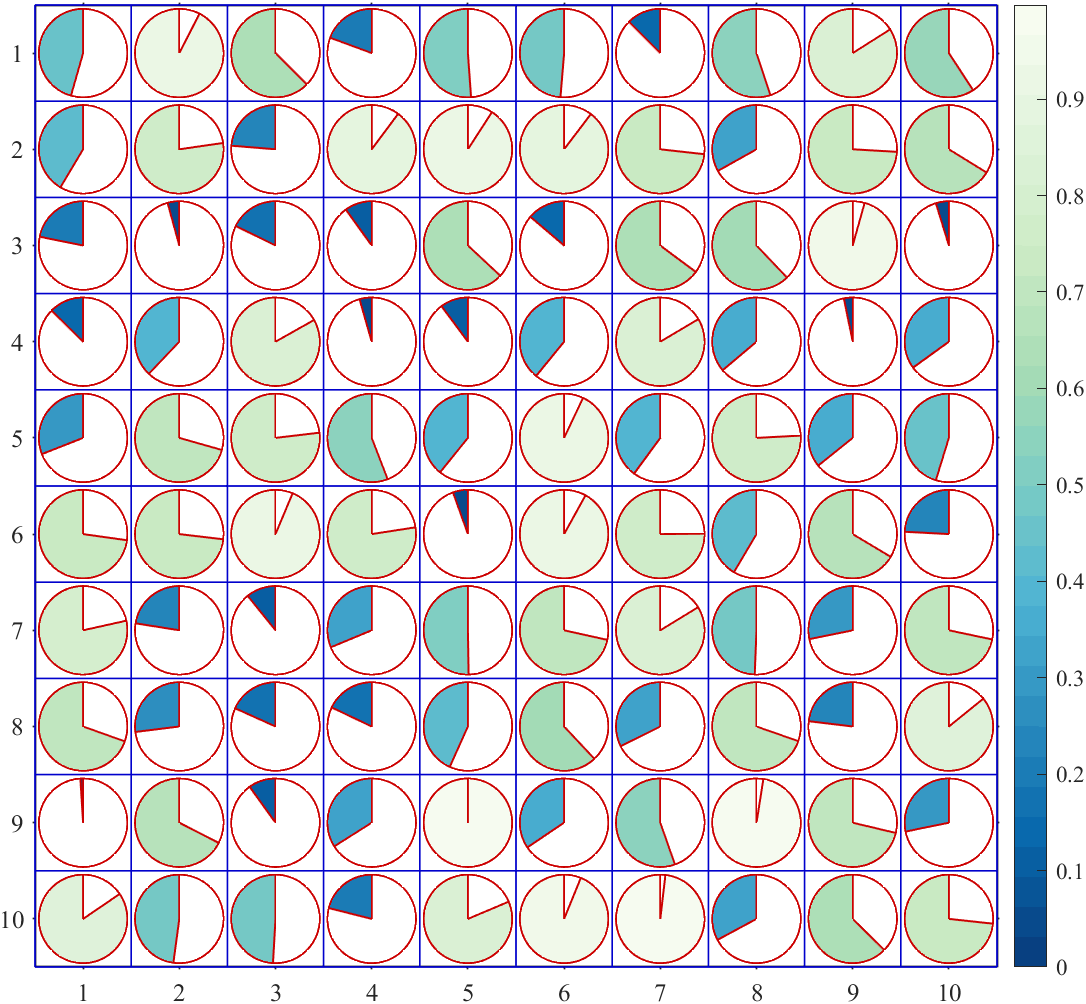
- setBox :修饰边框
- setPatch :修饰图形
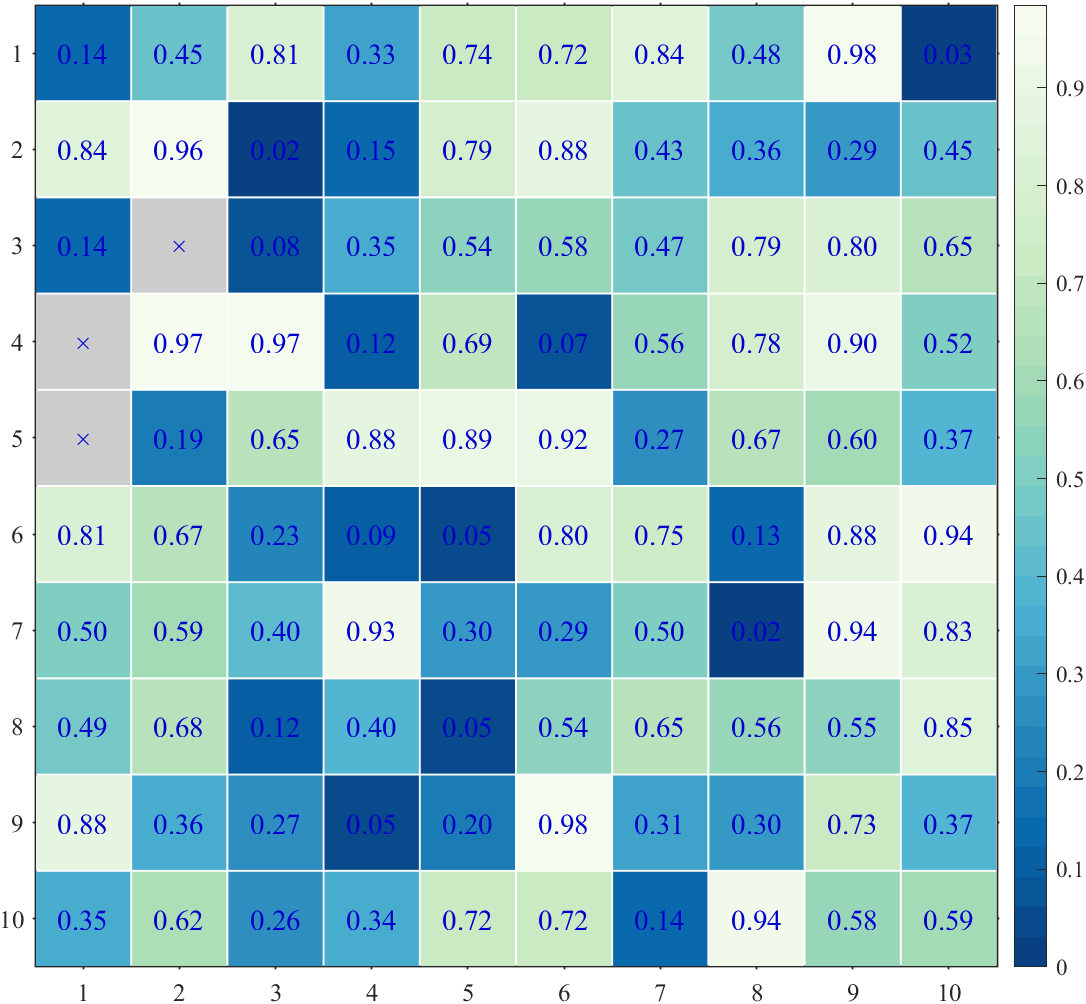
- setText :修饰文本
figure()
Data=rand(10,10);SHM=SHeatmap(Data,'Format','pie');
SHM=SHM.draw();
% 容器边框设置为蓝色
% 图形边框设置为红色
% The container box border is set to blue
% The drawing border is set to red
SHM.setBox('Color',[0,0,.8])
SHM.setPatch('EdgeColor',[.8,0,0])figure()
Data=rand(10,10);
Data([4,5,13])=nan;SHM=SHeatmap(Data,'Format','sq');
SHM=SHM.draw();
% 设置文本为蓝色并修改字号
% Set the text to blue and modify the font size
SHM.setText('Color',[0,0,.8],'FontSize',14)
5 局部修饰
- setTextMN
- setPatchMN
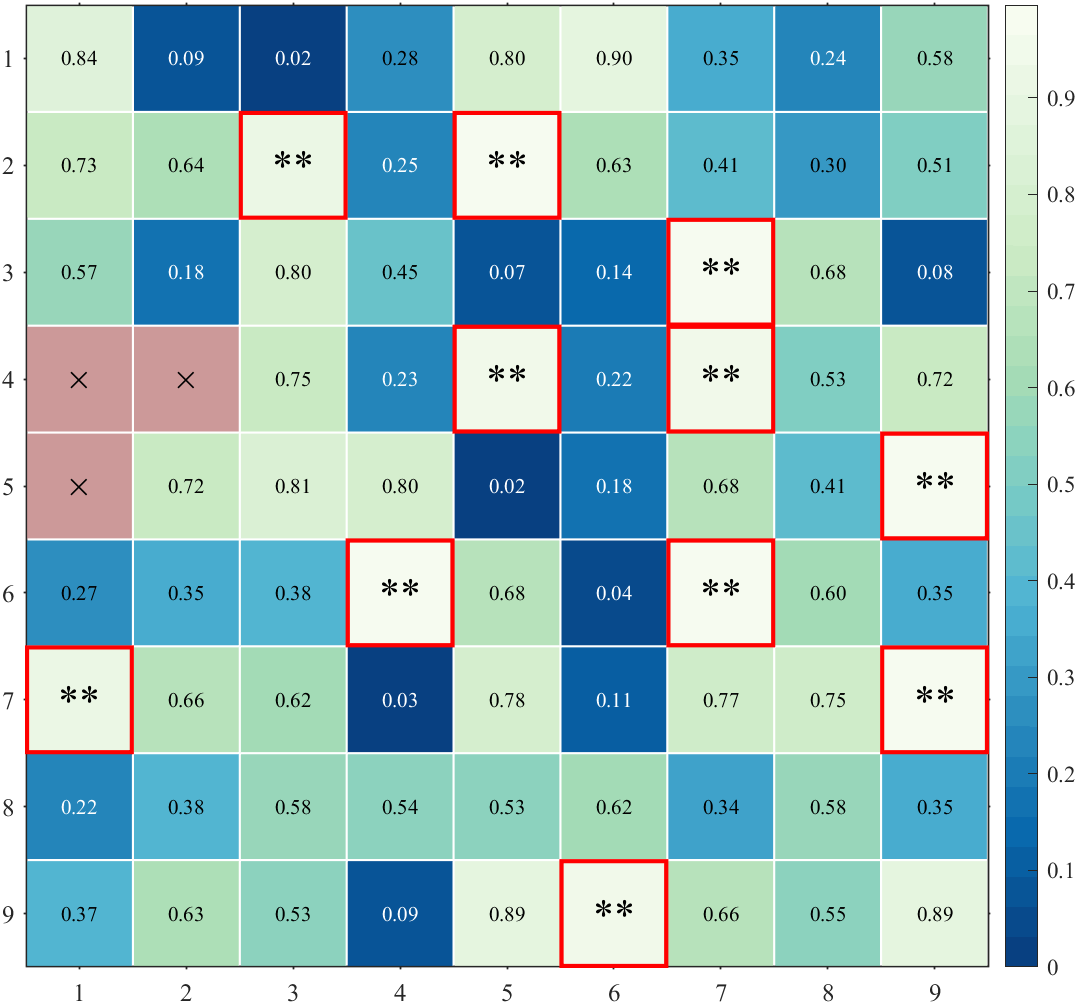
设置第m行n列对象的属性:举个例子,把数值大于0.9部分文字变为星号,并用红色框框起来,并改编NaN处颜色。
figure()
Data=rand(9,9);
Data([4,5,13])=nan;
% 绘制方块形状热图
SHM=SHeatmap(Data,'Format','sq');
SHM=SHM.draw();
% 显示文本(Show Text)
SHM.setText();
for i=1:size(Data,1)for j=1:size(Data,2)if Data(i,j)>=.9SHM.setTextMN(i,j,'String','**','FontSize',20)         % 修改>=0.9方块颜色SHM.setPatchMN(i,j,'EdgeColor',[1,0,0],'LineWidth',2)  % 修改>=0.9方块文本为**endif isnan(Data(i,j))SHM.setPatchMN(i,j,'FaceColor',[.8,.6,.6]) % 修改NaN处颜色endend
end
工具函数完整代码
SHeatmap
classdef SHeatmap
% =========================================================================
% Format
% -------------------------------------------------------------------------
% sq    : square (default)   : 方形(默认)
% pie   : pie chart          : 饼图
% circ  : circular           : 圆形
% oval  : oval               : 椭圆形
% hex   : hexagon            :六边形
% asq   : auto-size square   :自带调整大小的方形
% acirc : auto-size circular :自带调整大小的圆形
% =========================================================================
% @author : slandarer
% 公众号  : slandarer随笔
% -------------------------------------------------------------------------
% Zhaoxu Liu / slandarer (2023). special heatmap
% (https://www.mathworks.com/matlabcentral/fileexchange/125520-special-heatmap),
% MATLAB Central File Exchange. 检索来源 2023/3/1.
% -------------------------------------------------------------------------propertiesax,arginList={'Format','Parent'}Format='sq'  % sq    : square (default)   : 方形(默认)% pie   : pie chart          : 饼图% circ  : circular           : 圆形% oval  : oval               : 椭圆形% hex   : hexagon            :六边形% asq   : auto-size square   :自带调整大小的方形% acirc : auto-size circular :自带调整大小的圆形DatadfColor1=[0.9686    0.9882    0.9412;    0.9454    0.9791    0.9199;    0.9221    0.9700    0.8987;    0.8988    0.9609    0.8774;0.8759    0.9519    0.8560;    0.8557    0.9438    0.8338;    0.8354    0.9357    0.8115;    0.8152    0.9276    0.7892;0.7909    0.9180    0.7685;    0.7545    0.9039    0.7523;    0.7180    0.8897    0.7361;    0.6816    0.8755    0.7199;0.6417    0.8602    0.7155;    0.5962    0.8430    0.7307;    0.5507    0.8258    0.7459;    0.5051    0.8086    0.7610;0.4596    0.7873    0.7762;    0.4140    0.7620    0.7914;    0.3685    0.7367    0.8066;    0.3230    0.7114    0.8218;0.2837    0.6773    0.8142;    0.2483    0.6378    0.7929;    0.2129    0.5984    0.7717;    0.1775    0.5589    0.7504;0.1421    0.5217    0.7314;    0.1066    0.4853    0.7132;    0.0712    0.4488    0.6950;    0.0358    0.4124    0.6768;0.0314    0.3724    0.6364;    0.0314    0.3319    0.5929;    0.0314    0.2915    0.5494;    0.0314    0.2510    0.5059]dfColor2=[0.6196    0.0039    0.2588;    0.6892    0.0811    0.2753;    0.7588    0.1583    0.2917;    0.8283    0.2354    0.3082;0.8706    0.2966    0.2961;    0.9098    0.3561    0.2810;    0.9490    0.4156    0.2658;    0.9660    0.4932    0.2931;0.9774    0.5755    0.3311;    0.9887    0.6577    0.3690;    0.9930    0.7266    0.4176;    0.9943    0.7899    0.4707;0.9956    0.8531    0.5238;    0.9968    0.9020    0.5846;    0.9981    0.9412    0.6503;    0.9994    0.9804    0.7161;0.9842    0.9937    0.7244;    0.9526    0.9810    0.6750;    0.9209    0.9684    0.6257;    0.8721    0.9486    0.6022;0.7975    0.9183    0.6173;    0.7228    0.8879    0.6325;    0.6444    0.8564    0.6435;    0.5571    0.8223    0.6448;0.4698    0.7881    0.6460;    0.3868    0.7461    0.6531;    0.3211    0.6727    0.6835;    0.2553    0.5994    0.7139;0.2016    0.5261    0.7378;    0.2573    0.4540    0.7036;    0.3130    0.3819    0.6694;    0.3686    0.3098    0.6353]Colormap;maxV;Parent=[];patchHdl;boxHdl;pieHdl;textHdl% 修改为上下三角Type='Full';VarName;RLabelHdl;CLabelHdlendmethodsfunction obj=SHeatmap(Data,varargin)obj.Data=Data;obj.maxV=max(max(abs(obj.Data)));% 获取其他数据for i=1:2:(length(varargin)-1)tid=ismember(obj.arginList,varargin{i});if any(tid)obj.(obj.arginList{tid})=varargin{i+1};endend% 设置配色if any(any(obj.Data<0))obj.Colormap=obj.dfColor2;% tX=linspace(0,1,size(obj.Colormap,1));% tXi=linspace(0,1,256);% tR=interp1(tX,obj.Colormap(:,1),tXi);% tG=interp1(tX,obj.Colormap(:,2),tXi);% tB=interp1(tX,obj.Colormap(:,3),tXi);% obj.Colormap=[tR(:),tG(:),tB(:)];elseobj.Colormap=obj.dfColor1(end:-1:1,:);endendfunction obj=draw(obj)if isempty(obj.Parent)obj.ax=gca;elseobj.ax=obj.Parent;endobj.ax.NextPlot='add';obj.ax.Box='on';obj.ax.FontName='Times New Roman';obj.ax.FontSize=12;obj.ax.LineWidth=.8;obj.ax.XLim=[.5,size(obj.Data,2)+.5];obj.ax.YLim=[.5,size(obj.Data,1)+.5];obj.ax.YDir='reverse';obj.ax.TickDir='out';obj.ax.TickLength=[0.002,0.002];obj.ax.DataAspectRatio=[1,1,1];obj.ax.YTick=1:size(obj.Data,1);obj.ax.XTick=1:size(obj.Data,2);colormap(obj.ax,obj.Colormap)colorbar(obj.ax)if any(any(obj.Data<0))try caxis(obj.ax,obj.maxV.*[-1,1]),catch,endtry clim(obj.ax,obj.maxV.*[-1,1]),catch,endelsetry caxis(obj.ax,obj.maxV.*[0,1]),catch,endtry clim(obj.ax,obj.maxV.*[0,1]),catch,endend% 调整初始界面大小fig=obj.ax.Parent;fig.Color=[1,1,1];if max(fig.Position(3:4))<600fig.Position(3:4)=[1.6,1.8].*fig.Position(3:4);fig.Position(1:2)=fig.Position(1:2)./4;endbX1=repmat([.5,size(obj.Data,2)+.5,nan],[size(obj.Data,1)+1,1])';bY1=repmat((.5:1:(size(obj.Data,1)+.5))',[1,3])';bX2=repmat((.5:1:(size(obj.Data,2)+.5))',[1,3])';bY2=repmat([.5,size(obj.Data,1)+.5,nan],[size(obj.Data,2)+1,1])';obj.boxHdl=plot(obj.ax,[bX1(:);bX2(:)],[bY1(:);bY2(:)],'LineWidth',.8,'Color',[1,1,1].*.85);if isequal(obj.Format,'sq')set(obj.boxHdl,'Color',[1,1,1,0])enddisp(char([64 97 117 116 104 111 114 32 58 32,...115 108 97 110 100 97 114 101 114]))baseT=linspace(0,2*pi,200);hexT=linspace(0,2*pi,7);thetaMat=[1,-1;1,1].*sqrt(2)./2;for row=1:size(obj.Data,1)for col=1:size(obj.Data,2)    if isnan(obj.Data(row,col))obj.patchHdl(row,col)=fill(obj.ax,[-.5,.5,.5,-.5].*.98+col,[-.5,-.5,.5,.5].*.98+row,[.8,.8,.8],'EdgeColor','none');obj.pieHdl(row,col)=fill(obj.ax,[0,0,0,0],[0,0,0,0],[0,0,0]);obj.textHdl(row,col)=text(obj.ax,col,row,'×','FontName','Times New Roman','HorizontalAlignment','center','FontSize',20);elsetRatio=abs(obj.Data(row,col))./obj.maxV;switch obj.Formatcase 'sq'obj.patchHdl(row,col)=fill(obj.ax,[-.5,.5,.5,-.5].*.98+col,[-.5,-.5,.5,.5].*.98+row,...obj.Data(row,col),'EdgeColor','none');case 'asq'obj.patchHdl(row,col)=fill(obj.ax,[-.5,.5,.5,-.5].*.98.*tRatio+col,[-.5,-.5,.5,.5].*.98.*tRatio+row,...obj.Data(row,col),'EdgeColor','none');case 'pie'baseCircX=cos(baseT).*.92.*.5;baseCircY=sin(baseT).*.92.*.5;obj.pieHdl(row,col)=fill(obj.ax,baseCircX+col,baseCircY+row,...[1,1,1],'EdgeColor',[1,1,1].*.3,'LineWidth',.8);baseTheta=linspace(pi/2,pi/2+obj.Data(row,col)./obj.maxV.*2.*pi,200);basePieX=[0,cos(baseTheta).*.92.*.5];basePieY=[0,sin(baseTheta).*.92.*.5];obj.patchHdl(row,col)=fill(obj.ax,basePieX+col,-basePieY+row,...obj.Data(row,col),'EdgeColor',[1,1,1].*.3,'lineWidth',.8);case 'circ'baseCircX=cos(baseT).*.92.*.5;baseCircY=sin(baseT).*.92.*.5;obj.patchHdl(row,col)=fill(obj.ax,baseCircX+col,baseCircY+row,...obj.Data(row,col),'EdgeColor','none','lineWidth',.8);case 'acirc'baseCircX=cos(baseT).*.92.*.5;baseCircY=sin(baseT).*.92.*.5;obj.patchHdl(row,col)=fill(obj.ax,baseCircX.*tRatio+col,baseCircY.*tRatio+row,...obj.Data(row,col),'EdgeColor','none','lineWidth',.8);case 'oval'tValue=obj.Data(row,col)./obj.maxV;baseA=1+(tValue<=0).*tValue;baseB=1-(tValue>=0).*tValue;baseOvalX=cos(baseT).*.98.*.5.*baseA;baseOvalY=sin(baseT).*.98.*.5.*baseB;baseOvalXY=thetaMat*[baseOvalX;baseOvalY];obj.patchHdl(row,col)=fill(obj.ax,baseOvalXY(1,:)+col,-baseOvalXY(2,:)+row,...obj.Data(row,col),'EdgeColor',[1,1,1].*.3,'lineWidth',.8);case 'hex'obj.patchHdl(row,col)=fill(obj.ax,cos(hexT).*.5.*.98.*tRatio+col,sin(hexT).*.5.*.98.*tRatio+row,...obj.Data(row,col),'EdgeColor',[1,1,1].*.3,'lineWidth',.8);endobj.textHdl(row,col)=text(obj.ax,col,row,sprintf('%.2f',obj.Data(row,col)),'FontName','Times New Roman','HorizontalAlignment','center','Visible','off');endendend% -------------------------------------------------------------for i=1:length(obj.Data)obj.VarName{i}=['Var-',num2str(i)];endfor row=1:size(obj.Data,1)obj.RLabelHdl(row)=text(obj.ax,.5-.25,row,...obj.VarName{row},'HorizontalAlignment','right',...'FontName','Cambria','FontSize',12,'Visible','off');endfor col=1:size(obj.Data,2)obj.CLabelHdl(col)=text(obj.ax,col,.5-.25,...obj.VarName{col},'HorizontalAlignment','left',...'FontName','Cambria','FontSize',12,'Rotation',30,'Visible','off');endend% 修饰文本function setText(obj,varargin)graymap=mean(get(obj.ax,'Colormap'),2);climit=get(obj.ax,'CLim');for row=1:size(obj.Data,1)for col=1:size(obj.Data,2)     set(obj.textHdl(row,col),'Visible','on','Color',...[1,1,1].*(interp1(linspace(climit(1),climit(2),size(graymap,1)),graymap,obj.Data(row,col))<.5),varargin{:})endendswitch obj.Typecase 'triu'for row=1:size(obj.Data,1)for col=1:(row-1)set(obj.textHdl(row,col),'Visible','off')endendcase 'tril'for col=1:size(obj.Data,2)for row=1:(col-1)set(obj.textHdl(row,col),'Visible','off')endendcase 'triu0'for row=1:size(obj.Data,1)for col=1:(row)set(obj.textHdl(row,col),'Visible','off')endendcase 'tril0'for col=1:size(obj.Data,2)for row=1:(col)set(obj.textHdl(row,col),'Visible','off')endendendendfunction setTextMN(obj,m,n,varargin)set(obj.textHdl(m,n),varargin{:})end% 设置图形样式function setPatch(obj,varargin)for row=1:size(obj.Data,1)for col=1:size(obj.Data,2)   if ~isnan(obj.Data(row,col))set(obj.patchHdl(row,col),varargin{:})if isequal(obj.Format,'pie')set(obj.pieHdl(row,col),varargin{:})endendendendendfunction setPatchMN(obj,m,n,varargin)set(obj.patchHdl(m,n),varargin{:})if isequal(obj.Format,'pie')set(obj.pieHdl(m,n),varargin{:})endend% 设置框样式function setBox(obj,varargin)set(obj.boxHdl,varargin{:})end% 调整上下三角function obj=setType(obj,Type)if size(obj.Data,1)==size(obj.Data,2)obj.Type=Type;obj.ax.XColor='none';obj.ax.YColor='none';obj.ax.YAxisLocation='right';% obj.ax.YTickLabel='slandarer';bX1=repmat([.5,size(obj.Data,2)+.5,nan],[size(obj.Data,1)+1,1])';bY1=repmat((.5:1:(size(obj.Data,1)+.5))',[1,3])';bX2=repmat((.5:1:(size(obj.Data,2)+.5))',[1,3])';bY2=repmat([.5,size(obj.Data,1)+.5,nan],[size(obj.Data,2)+1,1])';for n=1:size(obj.Data,1)set(obj.RLabelHdl(n),'Visible','on');set(obj.CLabelHdl(n),'Visible','on');endswitch obj.Typecase 'triu'for row=1:size(obj.Data,1)for col=1:(row-1)set(obj.patchHdl(row,col),'Visible','off')set(obj.textHdl(row,col),'Visible','off')if isequal(obj.Format,'pie')set(obj.pieHdl(row,col),'Visible','off')endendendbX1(1,2:end)=bX1(1,2:end)+(0:size(obj.Data,1)-1);bY2(2,:)=[1.5:1:(size(obj.Data,1)+.5),(size(obj.Data,1)+.5)];set(obj.boxHdl,'XData',[bX1(:);bX2(:)],'YData',[bY1(:);bY2(:)])for n=1:size(obj.Data,1)set(obj.RLabelHdl(n),'Position',[.25-1+n,n,0]);set(obj.CLabelHdl(n),'Position',[n,.25,0]);endcase 'tril'for col=1:size(obj.Data,2)for row=1:(col-1)set(obj.patchHdl(row,col),'Visible','off')set(obj.textHdl(row,col),'Visible','off')if isequal(obj.Format,'pie')set(obj.pieHdl(row,col),'Visible','off')endendendbX1(2,1:end-1)=bX1(2,1:end-1)-(size(obj.Data,1)-1:-1:0);bY2(1,:)=[.5,.5:1:(size(obj.Data,1)-.5)];set(obj.boxHdl,'XData',[bX1(:);bX2(:)],'YData',[bY1(:);bY2(:)])for n=1:size(obj.Data,1)set(obj.RLabelHdl(n),'Position',[.25,n,0]);set(obj.CLabelHdl(n),'Position',[n,.25-1+n,0]);endcase 'triu0'for row=1:size(obj.Data,1)for col=1:(row)set(obj.patchHdl(row,col),'Visible','off')set(obj.textHdl(row,col),'Visible','off')if isequal(obj.Format,'pie')set(obj.pieHdl(row,col),'Visible','off')endendendbX1(1,:)=bX1(1,:)+1;bX1(1,2:end)=bX1(1,2:end)+(0:size(obj.Data,1)-1);bY2(2,:)=[1.5:1:(size(obj.Data,1)+.5),(size(obj.Data,1)+.5)]-1;set(obj.boxHdl,'XData',[bX1(:);bX2(:)],'YData',[bY1(:);bY2(:)])for n=1:size(obj.Data,1)set(obj.RLabelHdl(n),'Position',[.25+n,n,0]);set(obj.CLabelHdl(n),'Position',[n,.25,0]);endset(obj.CLabelHdl(1),'Visible','off');set(obj.RLabelHdl(size(obj.Data,1)),'Visible','off');case 'tril0'for col=1:size(obj.Data,2)for row=1:(col)set(obj.patchHdl(row,col),'Visible','off')set(obj.textHdl(row,col),'Visible','off')if isequal(obj.Format,'pie')set(obj.pieHdl(row,col),'Visible','off')endendendbX1(2,:)=bX1(2,:)-1;bX1(2,1:end-1)=bX1(2,1:end-1)-(size(obj.Data,1)-1:-1:0);bY2(1,:)=[.5,.5:1:(size(obj.Data,1)-.5)]+1;set(obj.boxHdl,'XData',[bX1(:);bX2(:)],'YData',[bY1(:);bY2(:)])for n=1:size(obj.Data,1)set(obj.RLabelHdl(n),'Position',[.25,n,0]);set(obj.CLabelHdl(n),'Position',[n,.25+n,0]);endset(obj.RLabelHdl(1),'Visible','off');set(obj.CLabelHdl(size(obj.Data,1)),'Visible','off');endendend% 设置变量标签function setVarName(obj,VarName)obj.VarName=VarName;VarNameLen=length(obj.VarName);for n=1:size(obj.Data,1)set(obj.RLabelHdl(n),'String',obj.VarName{mod(n-1,VarNameLen)+1})set(obj.CLabelHdl(n),'String',obj.VarName{mod(n-1,VarNameLen)+1})endendfunction setRowLabel(obj,varargin)for n=1:size(obj.Data,1)set(obj.RLabelHdl(n),varargin{:})endendfunction setColLabel(obj,varargin)for n=1:size(obj.Data,2)set(obj.CLabelHdl(n),varargin{:})endendend
% =========================================================================
% @author : slandarer
% 公众号  : slandarer随笔
% -------------------------------------------------------------------------
% Zhaoxu Liu / slandarer (2023). special heatmap
% (https://www.mathworks.com/matlabcentral/fileexchange/125520-special-heatmap),
% MATLAB Central File Exchange. 检索来源 2023/3/1.
% -------------------------------------------------------------------------
end
SDendrogram
function order=SDendrogram(Data,varargin)
% Zhaoxu Liu / slandarer (2023). special heatmap
% (https://www.mathworks.com/matlabcentral/fileexchange/125520-special-heatmap),
% MATLAB Central File Exchange. 检索来源 2023/3/1.
obj.arginList={'Orientation','Parent','Method'};
obj.Orientation='top';
% obj.MinLim=0;
obj.Parent=gca;
obj.DataLen=0;
obj.Method='average';
% 获取其他数据
for i=1:2:(length(varargin)-1)tid=ismember(obj.arginList,varargin{i});if any(tid)obj.(obj.arginList{tid})=varargin{i+1};end
end
figure();
if isequal(obj.Orientation,'top')tree=linkage(Data.',obj.Method);
elsetree=linkage(Data,obj.Method);
end
[treeHdl,~,order]=dendrogram(tree,0,'Orientation',obj.Orientation);
set(treeHdl,'Color',[0,0,0]);
set(treeHdl,'LineWidth',.8);
tempFig=treeHdl(1).Parent.Parent;
% 坐标区域修饰
axTree=copyAxes(tempFig,1,obj.Parent);obj.Parent
axTree.XColor='none';
axTree.YColor='none';
axTree.XTick=[];
axTree.YTick=[];
axTree.NextPlot='add';
delete(tempFig);
switch obj.Orientationcase 'top'obj.DataLen=size(Data,2);axTree.XLim=[1,obj.DataLen]+[-.5,.5];case 'left'obj.DataLen=size(Data,1);axTree.YDir='reverse';axTree.YLim=[1,obj.DataLen]+[-.5,.5];
end
% -------------------------------------------------------------------------function axbag=copyAxes(fig,k,newAx)% @author : slandarer% 公众号  : slandarer随笔% 知乎    : slandarer%% 此段代码解析详见公众号 slandarer随笔 文章:%《MATLAB | 如何复制figure图窗任意axes的全部信息?》% https://mp.weixin.qq.com/s/3i8C78pv6Ok1cmEZYPMyWgclassList(length(fig.Children))=true;for n=1:length(fig.Children)classList(n)=isa(fig.Children(n),'matlab.graphics.axis.Axes');endisaaxes=find(classList);oriAx=fig.Children(isaaxes(end-k+1));if isaaxes(end-k+1)-1<1||isa(fig.Children(isaaxes(end-k+1)-1),'matlab.graphics.axis.Axes')oriLgd=[];elseoriLgd=fig.Children(isaaxes(end-k+1)-1);endaxbag=copyobj([oriAx,oriLgd],newAx.Parent);axbag(1).Position=newAx.Position;delete(newAx)end
end
SClusterBlock
function [X,Y]=SClusterBlock(Class,varargin)
% Zhaoxu Liu / slandarer (2023). special heatmap
% (https://www.mathworks.com/matlabcentral/fileexchange/125520-special-heatmap),
% MATLAB Central File Exchange. 检索来源 2023/3/1.
obj.arginList={'Orientation','MinLim','Parent','ColorList','BlockProp'};
obj.Orientation='top';
obj.MinLim=0;
obj.Parent=gca;
obj.BlockProp={'LineWidth',.8};
obj.ColorList=...[0.5529    0.8275    0.78041.0000    1.0000    0.70200.7451    0.7294    0.85490.9843    0.5020    0.44710.5020    0.6941    0.82750.9922    0.7059    0.38430.7020    0.8706    0.41180.9882    0.8039    0.89800.8510    0.8510    0.85100.7373    0.5020    0.74120.8000    0.9216    0.77251.0000    0.9294    0.4353];
obj.ColorList=[obj.ColorList;rand(max(Class),3)./5+.5];
% 获取其他数据
for i=1:2:(length(varargin)-1)tid=ismember(obj.arginList,varargin{i});if any(tid)obj.(obj.arginList{tid})=varargin{i+1};end
end
obj.Parent.XColor='none';
obj.Parent.YColor='none';
obj.Parent.XTick=[];
obj.Parent.YTick=[];
obj.Parent.NextPlot='add';
Class=Class(:).';
CCList=[0,find([diff(Class),1]~=0)];
if isequal(obj.Orientation,'top')X=zeros([1,length(CCList)-1]);Y=ones([1,length(CCList)-1]).*(obj.MinLim+.5);
elseX=ones([1,length(CCList)-1]).*(obj.MinLim+.5);Y=zeros([1,length(CCList)-1]);
end
for i=1:length(CCList)-1CL=[CCList(i)+1,CCList(i+1)];if isequal(obj.Orientation,'top')fill(obj.Parent,CL([1,2,2,1])+[-.5,.5,.5,-.5],[obj.MinLim,obj.MinLim,obj.MinLim+1,obj.MinLim+1],...obj.ColorList(Class(CCList(i)+1),:),obj.BlockProp{:})X(i)=(CL(1)+CL(2))/2;elsefill(obj.Parent,[obj.MinLim,obj.MinLim,obj.MinLim+1,obj.MinLim+1],CL([1,2,2,1])+[-.5,.5,.5,-.5],...obj.ColorList(Class(CCList(i)+1),:),obj.BlockProp{:})obj.Parent.YDir='reverse';Y(i)=(CL(1)+CL(2))/2;end
end
axis tight
end
完
编程不易,希望大家该点赞的点赞,该在看的在看!!
未经允许本代码请勿作商业用途,引用的话可以引用我file exchange上的链接,可使用如下格式:
Zhaoxu Liu / slandarer (2023). special heatmap (https://www.mathworks.com/matlabcentral/fileexchange/125520-special-heatmap), MATLAB Central File Exchange. 检索来源 2023/3/17.
gitee仓库:https://gitee.com/slandarer/matlab-special-heatmap
百度网盘:
链接:https://pan.baidu.com/s/13t5w0aVzCWebNwaFfWSlnw?pwd=slan
提取码:slan
下一篇:Shell 传递参数